Intro: 🚀Welcome to the Future of AI Content Creation
Have you ever stared at a blank screen, knowing you need to create content but having no idea where to begin? Maybe you’ve struggled to write a blog post, think of social media captions, create product descriptions, or even draft a professional email. If so, you’re not alone.
Creating high-quality content has always required time, creativity, and consistent effort. However, in recent years, artificial intelligence (AI) has completely changed the way people create content. Today, students use AI to organize study notes, bloggers use it to generate article outlines, freelancers draft client emails more efficiently, and businesses create marketing content faster than ever before. Instead of replacing human creativity, AI has become a powerful assistant that helps people work smarter and more efficiently
When I started building FTPLAYEZ, I quickly realized that AI could generate ideas in seconds, but creating content that genuinely teaches people still required careful thinking, editing, and personal understanding. That experience changed the way I use AI. Today, I see it as a productivity partner—not a replacement for creativity or expertise.
The rapid growth of AI tools has made content creation more accessible than ever. Whether you’re a complete beginner or someone looking to improve your workflow, learning how to use AI responsibly can save time, increase productivity, and unlock new creative possibilities.
This guide is designed specifically for beginners. You don’t need any technical knowledge or previous experience with AI. We’ll explain everything in simple language, using practical examples that anyone can understand.
By the end of this guide, you’ll learn:
• What AI content creation really is.
• Why it has become such an important skill.
• The different types of content AI can help create.
• How the AI content creation process works.
• The best AI tools for beginners.
• Best practices to achieve better results.
• Common mistakes to avoid.
• Whether AI-generated content is good for SEO.
• A simple action plan to help you get started.
This isn’t just another article filled with definitions and theory. Our goal is to help you understand how to use AI effectively while keeping your creativity, critical thinking, and unique perspective at the center of every piece of content you create.
So, if you’re ready to discover how AI can transform the way you create content, let’s start with the most important question of all:
What exactly is AI content creation, and how does it work?
💡 In This Guide, You’ll Learn
✅ What AI content creation really is and how it works
✅ Why AI is transforming content creation across industries
✅ The different types of content AI can help you create
✅ A beginner-friendly AI content creation workflow
✅ The best AI tools to start using in 2026
✅ Best practices for creating helpful, high-quality AI content
✅ Common mistakes beginners should avoid
✅ How AI content affects SEO and what Google recommends
✅ Real-world examples of AI content creation
✅ A practical 5-day action plan to start your AI journey
📑 Table of Contents
1. 🚀 Welcome to the Future of AI Content Creation
2. 🤖 What Is AI Content Creation?
3. ⭐ Why AI Content Creation Is Transforming the Way We Create Content
4. 🎨 Types of Content AI Can Create
5. ⚙️ How AI Content Creation Works: Step-by-Step Beginner Workflow
6. 🛠️ Best AI Content Creation Tools for Beginners (2026)
7. ✅ Best Practices for Creating High-Quality AI Content
8. ❌ Common AI Content Creation Mistakes (And How to Avoid Them)
9. 📈 Is AI Content Good for SEO? Google’s View Explained
10. 🌍 Real-World AI Content Creation Examples You Can Learn From
11. 🎯 Your 5-Day AI Content Creation Action Plan
12. ❓ Frequently Asked Questions (FAQ)
13. 🎓 Final Thoughts: Start Your AI Content Creation Journey Today
🤖 What Is AI Content Creation? Everything Beginners Need to Know
❓What Is AI Content Creation?
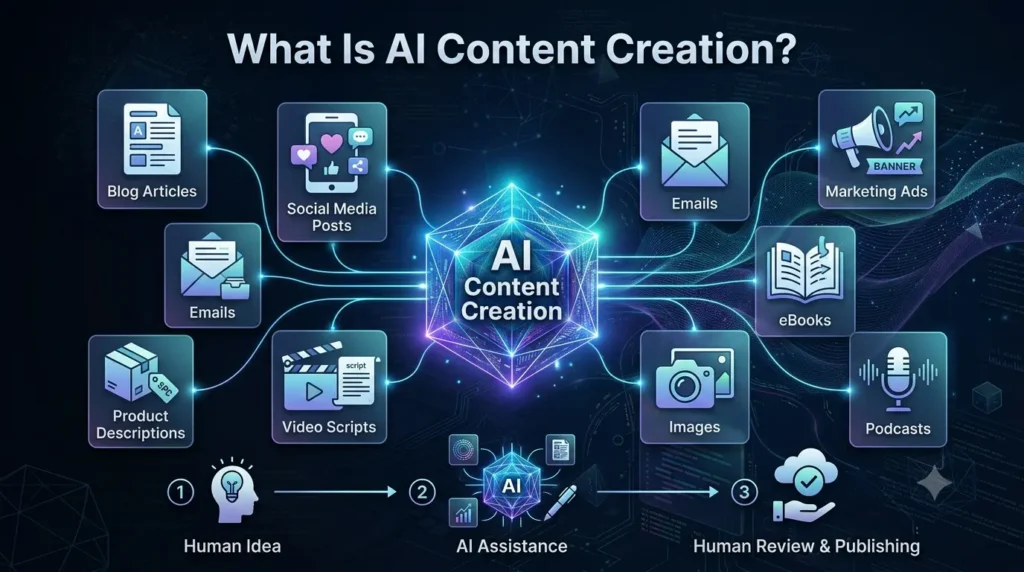
Imagine having a smart digital assistant that can help you write a blog post, generate social media captions, create product descriptions, draft professional emails, brainstorm new ideas, or even design images—all within minutes. That’s the power of AI content creation.
AI content creation is the process of using artificial intelligence tools to help create, improve, or organize different types of digital content. Instead of starting every project from a blank page, AI helps you generate ideas, produce drafts, and speed up repetitive tasks. However, it’s important to understand that AI is a tool designed to assist humans, not replace them.
Modern AI systems are trained on vast amounts of publicly available text and other data. They learn language patterns, grammar, writing styles, and relationships between words. When you give an AI tool a prompt or instruction, it predicts the most appropriate response based on what it has learned. It doesn’t “think” like a human or truly understand information—it generates content by recognizing patterns and probabilities.
This is why the quality of the output often depends on the quality of your instructions. A clear and detailed prompt usually produces much better results than a vague one.
🌍 How Does AI Create Content?
Although AI may seem like magic, the process is actually quite straightforward.
Here’s a simplified workflow:
1. You provide an instruction (prompt).
2. The AI analyzes your request.
3. It generates content based on learned language patterns.
4. You review, edit, and improve the output.
5. The final content is published or shared.
Think of AI as a talented assistant who works incredibly fast but still needs your guidance and final approval.
💡 FTPLAYEZ™ Quick Recap
AI doesn’t create perfect content automatically. It responds to your instructions, and your input plays a major role in determining the quality of the final result.
🤝 AI + Human: The Perfect Collaboration
One of the biggest misconceptions about AI is that it will replace human creativity.
In reality, the best results come when AI and humans work together.
AI is excellent at:
• Generating ideas quickly.
• Creating first drafts.
• Summarizing information.
• Rewriting content.
• Organizing complex information.
• Saving time on repetitive tasks.
Humans are essential for:
• Creativity and original thinking.
• Personal experiences.
• Emotions and storytelling.
• Fact-checking.
• Ethical decision-making.
• Understanding the audience.
• Final editing and quality control.
Think of it this way:
• AI provides speed.
• Humans provide quality.
When these strengths are combined, content creation becomes both faster and more valuable.
🌟 Real-World Examples of AI Content Creation
Let’s look at how different people use AI in everyday life.
🎓 Student
A student asks AI to summarize a long chapter into easy-to-understand notes before an exam.
✍️ Blogger
A blogger uses AI to generate blog ideas, create an outline, and overcome writer’s block before writing the final article.
💼 Freelancer
A freelancer drafts professional client emails and project proposals using AI, then personalizes them before sending.
🛍️ Small Business Owner
An online store owner creates engaging product descriptions and marketing copy in much less time.
🎥 YouTuber
A content creator generates video titles, script outlines, and thumbnail ideas to speed up the production process.In every example, AI acts as an assistant—not the final decision-maker.
💡 Actionable Tips for Beginners
If you’re just starting with AI content creation:
• Start with one AI tool instead of trying many at once.
• Give clear and specific prompts rather than short, vague instructions.
• Always review and edit AI-generated content before publishing.
• Add your own knowledge, experiences, and opinions to make the content unique.
• Keep learning through practice—your prompts and results will improve over time.
📌 Key Takeaway
AI content creation is not about replacing human creativity—it’s about enhancing it. By combining AI’s speed with human judgment, creativity, and expertise, you can create high-quality content more efficiently than ever before.
Whether you’re a student, blogger, freelancer, or business owner, learning to work alongside AI is becoming an increasingly valuable digital skill.
🔄 Smooth Transition
Now that you understand what AI content creation is and how it works, the next question is even more important:
Why has AI content creation become one of the most valuable skills in today’s digital world?
⭐ Why AI Content Creation Is Transforming the Way We Create Content
❓Why Does AI Content Creation Matter?
Imagine two people who need to write a 2,000-word blog article.
The first person starts with a blank page, spends hours researching, organizing ideas, writing, editing, and correcting mistakes.
The second person uses AI to brainstorm ideas, create a structured outline, draft the first version, and then spends most of their time improving, personalizing, and fact-checking the content.
Both can produce a high-quality article, but the second person often completes the work much faster while maintaining excellent quality.
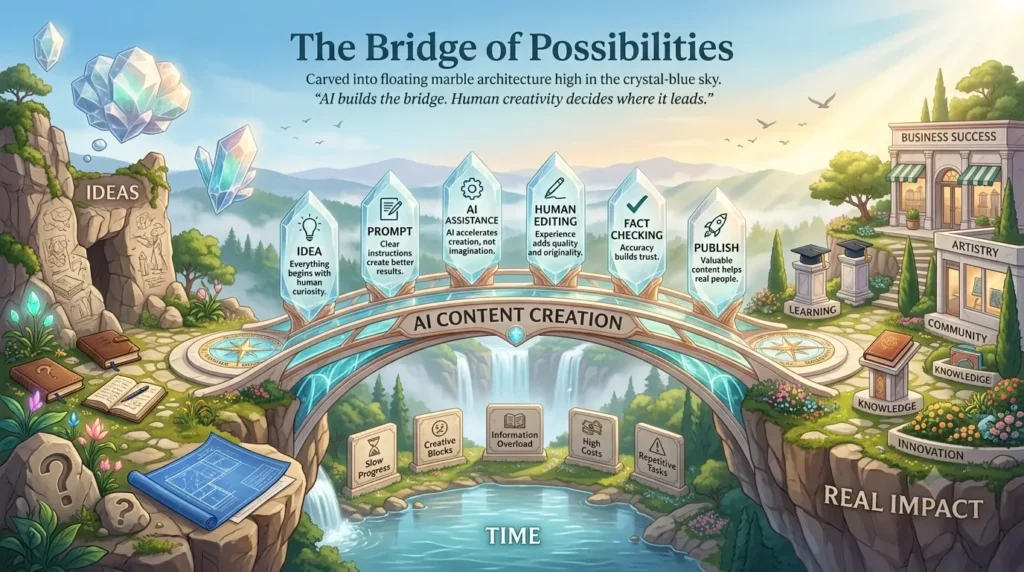
This simple example shows why AI content creation has become one of the most valuable digital skills in today’s world. It doesn’t eliminate the need for human creativity—it helps people use their creativity more efficiently.
Whether you’re a student, blogger, freelancer, entrepreneur, or marketing professional, AI can help you spend less time on repetitive tasks and more time on meaningful work.
⏰ 1. Saves Time Without Sacrificing Quality
One of AI’s biggest advantages is speed.
Tasks that once took hours—such as brainstorming ideas, drafting articles, writing email campaigns, or creating product descriptions—can now be completed in minutes with AI assistance.
However, faster doesn’t automatically mean better.
The real advantage comes when you use the time saved to improve your content by editing, adding personal insights, and checking for accuracy.
🌍 Real Example
A blogger who previously spent six hours writing an article may now use AI to prepare an outline and first draft in under an hour. The remaining time can be dedicated to refining the article, improving examples, and optimizing it for readers.
💡 Actionable Tip
Use AI to handle repetitive tasks, but always invest time in reviewing and enhancing the final content before publishing.
🚀 2. Increases Productivity
Productivity isn’t about working more hours—it’s about achieving better results in less time.
AI helps creators organize ideas, overcome writer’s block, summarize information, and automate repetitive writing tasks.
Instead of struggling to start, creators can focus on improving and expanding their ideas.
🌍 Real Example
A freelance writer managing multiple clients can use AI to prepare outlines, organize research, and draft proposals more efficiently. This allows them to spend more time understanding their clients’ needs and delivering higher-quality work.
💡 Actionable Tip
Use AI as a productivity partner, not as a replacement for your expertise.
🎨 3. Boosts Creativity Instead of Replacing It
Many beginners believe AI reduces creativity.
In reality, AI often helps people become more creative by giving them a starting point.
When you’re stuck, AI can suggest headlines, content ideas, outlines, alternative introductions, or different writing styles that inspire new directions.
Remember:
AI generates possibilities. Humans choose the best ideas.
🌍 Real Example
A YouTuber struggling to think of video topics can ask AI for twenty ideas. From those suggestions, they choose the most original concept and develop it using their own knowledge and personality.
💡 Actionable Tip
Never accept AI’s first answer automatically. Use it as inspiration, then improve it with your own creativity.
📈 4. Makes Content Creation Scalable
As your audience grows, creating content consistently becomes more challenging.
AI helps individuals and businesses produce content more efficiently while maintaining quality.
Instead of creating one piece of content at a time, creators can build structured workflows that save significant time.
For example, one blog article can be transformed into:
• Social media posts
• Email newsletters
• LinkedIn updates
• YouTube scripts
• Podcast outlines
• Infographics
This allows creators to reach more people without starting from scratch each time.
🌍 Real Example
A small business publishes one detailed blog each week and uses AI to adapt that blog into multiple marketing assets across different platforms.
💡 Actionable Tip
Think beyond a single article. Ask yourself, “How many different pieces of content can I create from this one idea?”
💰 5. Reduces Costs for Individuals and Small Businesses
Hiring writers, editors, designers, and marketers can be expensive, especially for beginners and small businesses.
While AI doesn’t replace professionals, it can help people complete many basic tasks independently.
This lowers the barrier to entry for students, entrepreneurs, freelancers, and creators who are just starting their journey.
🌍 Real Example
A new online store owner can use AI to write product descriptions, email campaigns, and social media captions before investing in a larger marketing team.
💡 Actionable Tip
Use AI to build your skills first. As your business grows, combine AI with human expertise for even better results.
🌍 Why Learning AI Content Creation Is Becoming a Future-Proof Skill
The digital world is changing rapidly.
Businesses, schools, creators, and organizations increasingly use AI to improve efficiency and productivity.
Learning how to work with AI—instead of fearing it—can help you stay competitive in the future job market.
While building FTPLAYEZ, I also realized that learning AI isn’t about finding shortcuts—it’s about learning a new way to solve problems. The more I practiced writing better prompts, reviewing AI outputs, and improving my own thinking, the more valuable AI became as a learning partner rather than just a writing tool.
However, one thing remains constant:
People who can think critically, communicate clearly, solve problems, and use AI responsibly will always have an advantage over those who rely entirely on automation.
AI is a powerful tool.
Your knowledge, creativity, ethics, and judgment are what truly make your content valuable.
💡 FTPLAYEZ™ Quick Recap
✔ AI saves time by handling repetitive tasks.
✔ It improves productivity by helping creators work more efficiently.
✔ AI supports creativity rather than replacing it.
✔ It makes content creation easier to scale across multiple platforms.
✔ It reduces costs and creates new opportunities for beginners and businesses.
The biggest advantage isn’t AI itself—it’s knowing how to use AI effectively.
🔄 Smooth Transition
Now that you understand why AI content creation has become such an important skill, let’s explore something even more exciting.
AI isn’t limited to writing blog posts—it can help create many different types of digital content.
In the next section, we’ll discover exactly what kinds of content AI can create and how different people use these capabilities in real life.
✍️ Types of Content AI Can Create (With Real Examples)
❓What Types of Content Can AI Create?
One of the biggest reasons AI has become so popular is its versatility. It isn’t limited to writing articles—it can assist with almost every type of digital content.
Whether you’re a student, creator, freelancer, marketer, or business owner, AI can help you work faster while maintaining quality. The key is knowing which type of content AI can create and how to use it effectively.
Let’s explore the most common use cases.
📝 1. Blog Articles
AI can help generate:
• Blog ideas
• Headlines
• Outlines
• First drafts
• Meta descriptions
• Content summaries
🌍 Real Example
A travel blogger asks AI to create an outline for “10 Best Places to Visit in Japan.” Instead of spending an hour planning, they receive a structured outline in minutes and then add their own experiences and research.
💡 Tip: Use AI for planning and drafting, but always add your own expertise and personal insights.
📱 2. Social Media Content
Creating daily posts can be time-consuming.
AI can generate:
• Instagram captions
• LinkedIn posts
• Facebook updates
• X (Twitter) posts
• Hashtag suggestions
• Content ideas
🌍 Real Example
A fitness coach uses AI to write motivational Instagram captions for an entire week, then edits each post to match their personal style.
📧 3. Emails and Newsletters
Writing professional emails becomes much easier with AI.
It can help create:
• Business emails
• Client proposals
• Welcome emails
• Newsletter content
• Follow-up messages
🌍 Real Example
A freelancer uses AI to draft a project proposal, then customizes it before sending it to a client.
🛒 4. Product Descriptions
For e-commerce businesses, writing hundreds of product descriptions can take days.
AI can create clear, engaging descriptions that highlight features and benefits.
🌍 Real Example
An online clothing store uses AI to generate descriptions for new products, saving hours of manual work.
🎥 5. Video Scripts
Content creators often struggle with scripting.
AI can assist with:
• YouTube scripts
• Short-form video ideas
• Podcast outlines
• Presentation scripts
🌍 Real Example
A YouTuber asks AI to create a script outline for “Top 5 Budget Smartphones in 2026” and then adds personal reviews and opinions.
🎨 6. Images and Visual Content
Modern AI tools can generate:
• Blog featured images
• Social media graphics
• Illustrations
• Presentation visuals
• Marketing posters
🌍 Real Example
A small business creates attractive promotional graphics for a seasonal sale using AI-powered design tools.
📚 7. Study Notes and Educational Content
Students and teachers also benefit from AI.
It can help:
• Summarize chapters
• Create quizzes
• Explain complex concepts
• Generate flashcards
• Organize notes
🌍 Real Example
A student converts a lengthy history chapter into concise revision notes before an exam.
📊 Where AI Performs Best
| Content Type | AI Assistance |
| Blog outlines | ⭐⭐⭐⭐⭐ |
| Social media posts | ⭐⭐⭐⭐⭐ |
| Emails | ⭐⭐⭐⭐⭐ |
| Product descriptions | ⭐⭐⭐⭐☆ |
| Video scripts | ⭐⭐⭐⭐☆ |
| Images | ⭐⭐⭐⭐☆ |
| Study notes | ⭐⭐⭐⭐⭐ |
The ratings reflect how effectively AI can assist. Human review is still essential for accuracy and originality.
📌 Key Takeaway
AI is not designed to create only one type of content—it can support almost every stage of the content creation process. However, the best results come when AI handles repetitive tasks while humans provide creativity, expertise, and final judgment.
💡 FTPLAYEZ™ Quick Recap
✔ AI can help create blogs, social media posts, emails, product descriptions, scripts, images, and educational content.
✔ Different AI tools excel at different tasks.
✔ The highest-quality content is created through collaboration between AI and humans, not by relying on AI alone.
🔄 Smooth Transition
Now that you’ve seen what AI can create, the next question is:
How does the entire AI content creation process actually work from start to finish?
In the next section, we’ll explore a simple step-by-step workflow that every beginner can follow to create high-quality AI-assisted content confidently.
⚙️ How AI Content Creation Works: Step-by-Step Beginner Workflow
❓How Does AI Content Creation Work?
Many beginners believe AI works like magic—you type a few words, press a button, and instantly receive perfect content.
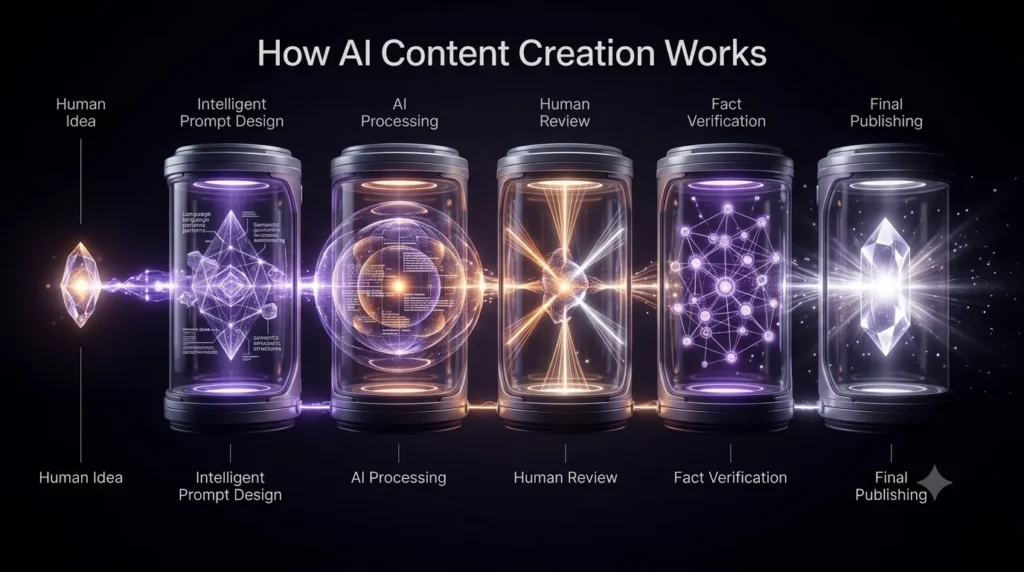
In reality, creating high-quality AI-assisted content is a step-by-step process. AI provides speed and assistance, but human guidance is what turns a basic draft into valuable content.
Let’s walk through the complete workflow.
🎯 Step 1: Define Your Goal
Before opening any AI tool, ask yourself one simple question:
“What do I want to create?”
Your goal determines the type of prompt you’ll write and the results you’ll receive.
For example, your goal might be to:
• Write a blog post
• Create social media content
• Draft an email
• Generate product descriptions
• Brainstorm content ideas
• Prepare study notes
🌍 Real Example
“Write something about football.”
Try:
“Write a beginner-friendly 1,500-word blog outline explaining the basic rules of football.”
The second instruction is much clearer, so the AI can produce a more useful response.
💡 Actionable Tip
Spend a minute defining your objective before writing your prompt. A clear goal saves time later.
✍️ Step 2: Write an Effective Prompt
Your prompt is the instruction you give to the AI. Think of it as giving directions to a teammate—the clearer your instructions, the better the result.
A strong prompt usually includes:
• The task
• The audience
• The tone
• The desired format
• Any specific requirements
🌍 Real Example
Instead of:
“Write a blog.”
Use:
“Write a beginner-friendly blog outline about AI content creation for students. Use simple English and include practical examples.”
💡 Actionable Tip
Don’t be afraid to refine your prompt. Small improvements in your instructions often lead to much better results.
🤖 Step 3: Generate the First Draft
Once your prompt is ready, the AI generates a draft based on your instructions.
Remember, this is only the first version, not the finished product.
Think of it as a starting point that saves you from staring at a blank page.
🌍 Real Example
A blogger asks AI to create a first draft for an article. Instead of publishing it immediately, they review the structure, rewrite weak sections, and add personal knowledge.
💡 Actionable Tip
Treat AI output as raw material. Your job is to shape it into something accurate, useful, and unique.
✏️ Step 4: Edit and Improve the Content
This is where humans make the biggest difference.
Review the content carefully by asking:
• Is the information accurate?
• Is the language easy to understand?
• Does it match my audience?
• Can I add personal experience or better examples?
• Are there any unnecessary or repetitive sentences?
Editing transforms a good draft into high-quality content.
🌍 Real Example
A freelancer removes repetitive phrases, adds a real client example, and simplifies technical language before sending an article to a customer.
💡 Actionable Tip
Never skip editing. Even the best AI tools can make mistakes or produce generic content.
✅ Step 5: Fact-Check and Optimize
AI can occasionally provide outdated or incorrect information. Before publishing, verify important facts, statistics, names, and sources.
If you’re creating content for search engines, also check:
• Headings
• Keywords
• Readability
• Internal links
• Grammar
• Formatting
🌍 Real Example
A business owner verifies product specifications before publishing AI-generated descriptions on an online store.
💡 Actionable Tip
Always review factual claims using reliable sources, especially for educational, financial, legal, or health-related topics.
🚀 Step 6: Publish and Keep Improving
Once your content is edited and verified, it’s ready to publish.
But publishing isn’t the end of the process.
Pay attention to reader feedback, update outdated information, and continue improving your content over time.
Great content evolves as new information becomes available.
🌍 Real Example
A blogger updates an article every few months by adding new AI tools, fresh examples, and the latest industry developments.
💡 Actionable Tip
Review your important articles regularly to keep them accurate, relevant, and useful.
📊 Simple AI Content Creation Workflow
Set Your Goal
        ↓
Write a Clear Prompt
        ↓
Generate the First Draft
        ↓
Edit and Improve
        ↓
Fact-Check & Optimize
        ↓
     Publish
        ↓
Update When Needed
📌 Key Takeaway
AI content creation is a collaborative process—not a one-click solution. The best results come from combining clear goals, effective prompts, careful editing, and human judgment. AI provides speed, while you provide creativity, accuracy, and value.
💡 FTPLAYEZ™ Quick Recap
✔ Start with a clear goal.
✔ Write detailed prompts.
✔ Treat AI output as a first draft.
✔ Edit and fact-check everything.
✔ Publish confidently and keep improving over time.
🔄 Smooth Transition
Now that you understand how the AI content creation process works, the next step is choosing the right tool for the job.
Not every AI tool is designed for the same purpose. Some are excellent for writing, while others specialize in research, design, or editing.
In the next section, we’ll compare the best AI content creation tools for beginners in 2026, helping you choose the right one based on your goals and experience.
🛠️ Best AI Content Creation Tools for Beginners in 2026
❓Which AI Content Creation Tool Should You Choose?
One of the most common questions beginners ask is, “Which AI tool is the best?” The truth is, there isn’t a single tool that’s perfect for every task. Each AI tool has its own strengths, features, and ideal use cases.
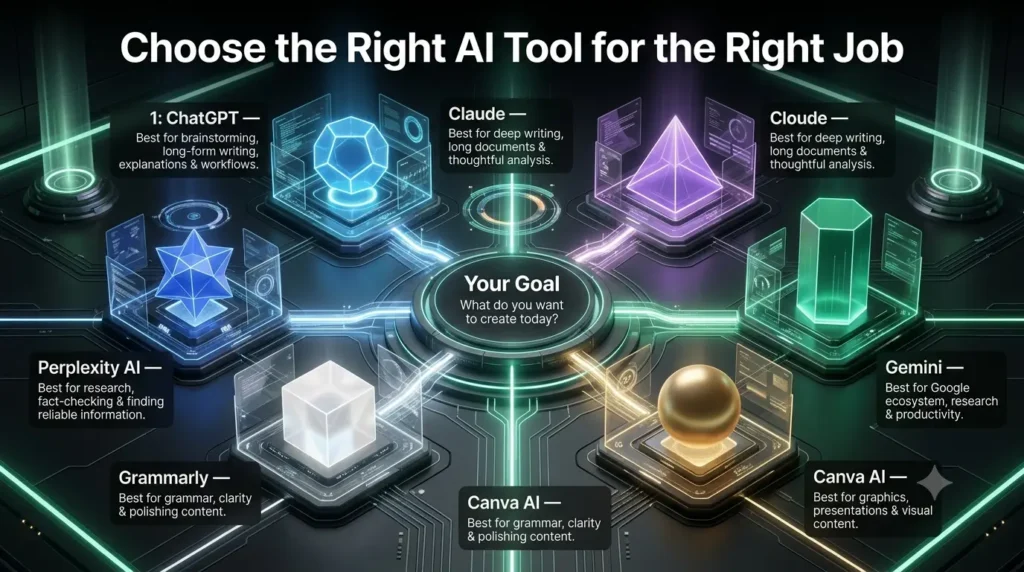
Instead of searching for the “best” AI, focus on finding the right tool for your specific needs. Let’s look at some of the most popular AI content creation tools available today.
🤖 ChatGPT
ChatGPT is one of the most versatile AI assistants for content creation. It can help with brainstorming ideas, writing blog posts, drafting emails, creating social media content, summarizing information, and much more.
Best For: Bloggers, students, freelancers, marketers, and beginners.
Strength: Easy to use and supports a wide range of writing tasks.
🧠 Claude
Claude is designed to produce clear, thoughtful, and well-structured content. It’s particularly useful for long-form writing and refining drafts.
Best For: Writers, researchers, and professionals working on detailed documents.
Strength: Excellent readability and natural writing style.
💎 Gemini
Gemini integrates well with Google’s ecosystem and can assist with writing, brainstorming, research, and productivity tasks.
Best For: Users who frequently use Google services like Docs, Gmail, and Drive.
Strength: Strong integration with Google tools.
🎨 Canva AI
Canva AI combines design and AI to help users create presentations, social media graphics, posters, and other visual content without advanced design skills.
Best For: Content creators, students, and small businesses.
Strength: Quick and beginner-friendly graphic design.
✍️ Grammarly
Grammarly focuses on improving writing rather than generating it. It checks grammar, spelling, clarity, punctuation, and tone to make your content more professional.
Best For: Anyone who wants polished, error-free writing.
Strength: Excellent editing and proofreading assistance.
🔍 Perplexity
Perplexity is an AI-powered research assistant that helps users explore topics, understand concepts, and discover reliable sources more efficiently.
Best For: Students, researchers, and anyone gathering information before writing.
Strength: Fast research with source-backed responses.
📊 Quick Comparison
| Tool | Best For |
| ChatGPT | Writing, brainstorming, and content creation |
| Claude | Long-form writing and document refinement |
| Gemini | Productivity and Google ecosystem users |
| Canva AI | Visual content and graphic design |
| Grammarly | Editing and improving writing |
| Perplexity | Research and information gathering |
📌 Key Takeaway
The best AI tool depends on your goals. If you’re just starting, ChatGPT is an excellent all-around choice. As your skills grow, combining multiple AI tools can help you write, research, design, and edit more efficiently.
💡 FTPLAYEZ™ Quick Recap
✔ No single AI tool is perfect for every task.
✔ Choose tools based on your specific needs.
✔ Combining different AI tools often produces the best results.
🔄 Smooth Transition
Now that you know which AI tools can support your content creation journey, the next step is learning how to use them effectively.
In the next section, we’ll explore the best practices for AI content creation so you can produce content that is accurate, valuable, and genuinely helpful to your audience.
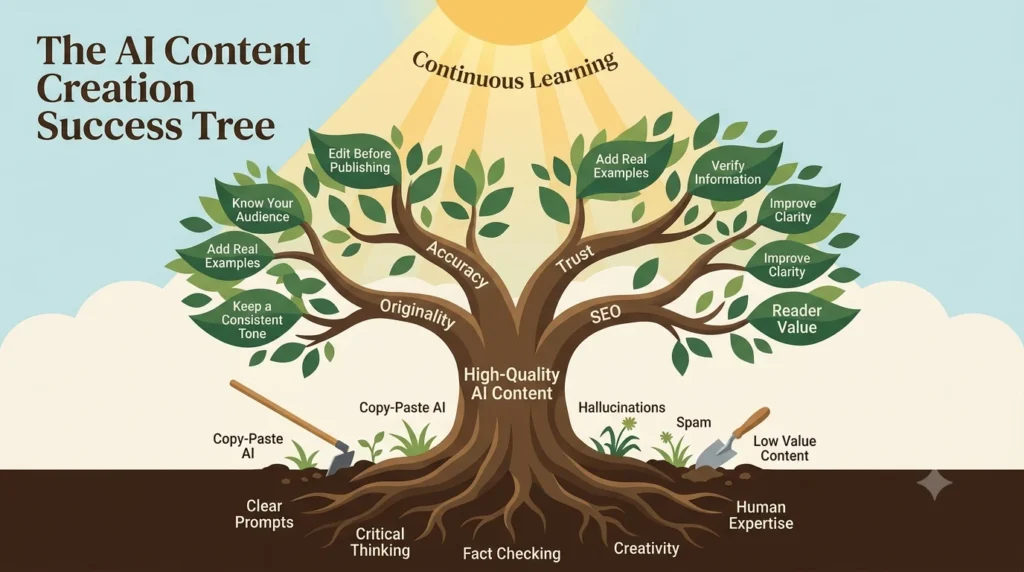
✅ Best Practices to Create High-Quality AI Content
❓How Can You Get the Best Results from AI?
Using AI effectively isn’t just about choosing the right tool—it’s about using it the right way. Two people can use the same AI assistant and get completely different results depending on how they approach the process.
The following best practices will help you create content that is more accurate, engaging, and valuable.
🎯 1. Give Clear and Specific Prompts
AI performs best when your instructions are detailed. Instead of asking for “a blog,” explain the topic, audience, tone, and desired format.
🌍 Real Example
Instead of writing:
“Write about AI.”
Try:
“Write a beginner-friendly blog introduction about AI content creation for students using simple English.”
💡 Actionable Tip
Before submitting a prompt, ask yourself: “Have I clearly explained what I want?”
✅ 2. Always Review and Edit the Output
AI can generate excellent drafts, but it isn’t perfect. Reviewing the content helps you correct mistakes, improve clarity, and make the writing sound more natural.
🌍 Real Example
A blogger rewrites the introduction, removes repetitive sentences, and adds personal insights before publishing.
💡 Actionable Tip
Treat AI-generated content as a first draft, not the final version.
📚 3. Verify Facts and Information
AI can occasionally provide outdated or incorrect information. Always verify important facts, statistics, dates, and sources before publishing.
🌍 Real Example
A business owner checks product specifications before uploading descriptions to an online store.
💡 Actionable Tip
Fact-check information using reliable and up-to-date sources.
✨ 4. Add Your Own Experience and Voice
The most valuable content reflects your knowledge and perspective. Personal examples, practical experiences, and unique insights make your content more trustworthy and memorable.
🌍 Real Example
Instead of only explaining a concept, a freelancer includes lessons learned from working with real clients.
💡 Actionable Tip
Ask yourself, “What can I add that AI doesn’t know?”
👥 5. Write for People, Not Just Search Engines
SEO is important, but your first priority should always be helping your readers. Clear explanations and useful information naturally improve user experience.
🌍 Real Example
A tutorial written in simple language is more likely to satisfy readers than one filled with unnecessary keywords.
💡 Actionable Tip
Create content that answers real questions and solves real problems.
📌 Key Takeaway
Great AI content is created through collaboration. AI provides speed and structure, while you contribute accuracy, creativity, and human insight. The better your prompts and editing process, the better your final content will be.
💡 FTPLAYEZ™ Quick Recap
✔ Write clear prompts.
✔ Edit every AI-generated draft.
✔ Verify important facts.
✔ Add your own expertise.
✔ Always create content for people first.
🔄 Smooth Transition
Now that you know the best practices for creating high-quality AI content, it’s equally important to understand what not to do.
Even powerful AI tools can produce poor results if they’re used incorrectly.
In the next section, we’ll explore the most common AI content creation mistakes beginners make—and how you can avoid them from day one.
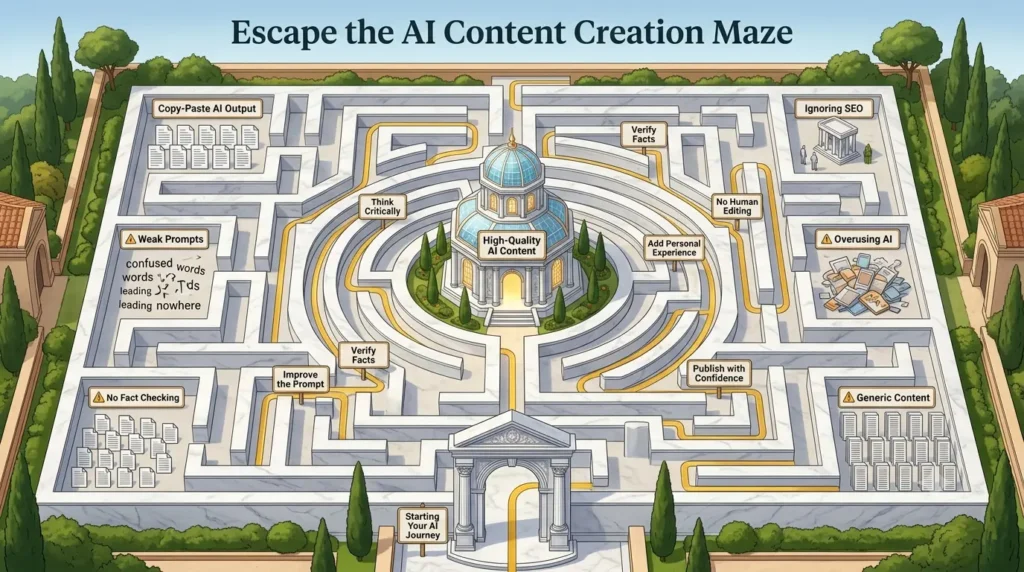
❌ Common AI Content Creation Mistakes (And How to Avoid Them)
❓What Mistakes Should Beginners Avoid?
AI is a powerful assistant, but using it incorrectly can lead to inaccurate, generic, or low-quality content. Many beginners make the same mistakes when they first start using AI. The good news is that these mistakes are easy to avoid once you’re aware of them.
Let’s look at the most common ones.
📋 1. Copying AI Output Without Editing
One of the biggest mistakes is publishing AI-generated content exactly as it is. AI can make factual mistakes, repeat ideas, or produce content that lacks personality.
🌍 Real Example
A blogger copies an AI-generated article directly to their website without reviewing it. The article contains outdated information and repetitive paragraphs, reducing its quality and credibility.
💡 Actionable Tip
Always review, edit, and personalize AI-generated content before publishing.
🎯 2. Using Vague Prompts
AI can only respond based on the instructions you provide. Short or unclear prompts usually lead to generic results.
🌍 Real Example
Instead of asking, “Write about marketing,” ask, “Write a beginner-friendly introduction to digital marketing for small business owners.”
💡 Actionable Tip
Be specific about the topic, audience, tone, and format whenever possible.
🔍 3. Skipping Fact-Checking
Although AI is impressive, it isn’t always correct. It can occasionally provide outdated or inaccurate information.
🌍 Real Example
A student submits an assignment without verifying AI-generated facts and later discovers that some information was incorrect.
💡 Actionable Tip
Double-check important facts, statistics, and references before sharing your content.
⚠️ 4. Ignoring SEO and Readability
Good content should be easy to read and well-structured. Large paragraphs, poor headings, and missing keywords can reduce both user experience and search visibility.
💡 Actionable Tip
Use clear headings, short paragraphs, and natural keyword placement to improve readability.
🤝 5. Depending Entirely on AI
AI should support your work—not replace your thinking. Relying completely on AI can make your content feel generic and less trustworthy.
🌍 Real Example
Two writers use AI for the same topic. One publishes the AI draft unchanged, while the other adds personal experience and practical insights. The second article is far more valuable to readers.
💡 Actionable Tip
Use AI as your assistant, but let your knowledge and creativity shape the final content.
📌 Key Takeaway
Most AI content mistakes happen because people trust the first output too much. By writing better prompts, editing carefully, verifying facts, and adding your own expertise, you can create content that is both helpful and trustworthy.
💡 FTPLAYEZ™ Quick Recap
✔ Never publish AI content without editing.
✔ Write clear and detailed prompts.
✔ Always verify important information.
✔ Focus on readability and SEO.
✔ Let AI assist your creativity—not replace it.
🔄 Smooth Transition
You’ve learned how to avoid the most common AI content creation mistakes. But one important question still remains:
Can AI-generated content actually rank on Google?
In the next section, we’ll explore Google’s view on AI content, SEO best practices, and how to create AI-assisted content that provides real value to both readers and search engines.
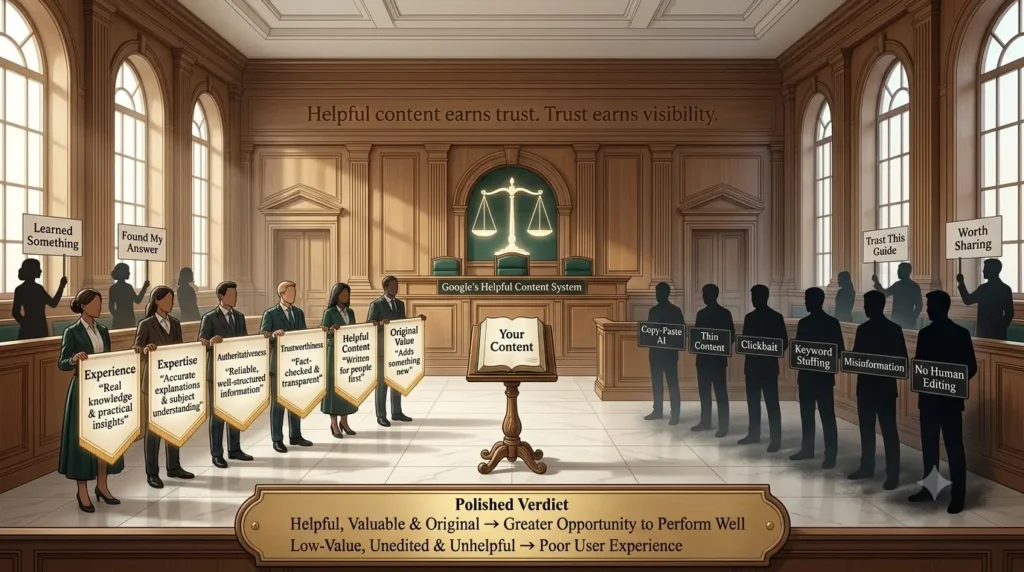
📈 Is AI Content Good for SEO? Google’s View Explained
❓Can AI-Generated Content Rank on Google?
Yes—but only if it provides genuine value to readers.
A common myth is that Google automatically penalizes AI-generated content. That’s not true. Google doesn’t focus on how content is created; it focuses on whether the content is helpful, accurate, original, and useful to people.
In other words, AI is simply a tool. The real factor is the quality of the final content.
At FTPLAYEZ, our goal is never to publish content simply because AI can generate it. Every article goes through careful editing, fact-checking, and practical improvements before it reaches readers. We believe AI should help create better educational content—not replace thoughtful human learning.
🔍 What Does Google Look For?
Google aims to show users the most helpful and trustworthy information. Whether you write content yourself or use
AI assistance, your article should:
• Answer the reader’s questions clearly.
• Be accurate and well-organized.
• Offer original insights or practical value.
• Be easy to read and understand.
If your content achieves these goals, it has a much better chance of performing well in search results.
⭐ Understanding E-E-A-T
Google encourages content that demonstrates E-E-A-T,
which stands for:
• Experience – Real-life knowledge or practical use.
• Expertise – A strong understanding of the topic.
• Authoritativeness – Being a trusted source.
• Trustworthiness – Providing honest and reliable information.
Adding your own experiences, examples, and careful research helps strengthen these qualities.
🌍 Real Example
Suppose two websites publish an article about AI content creation. One copies AI output without editing, while the other improves it with practical tips, real examples, and careful fact-checking. The second article is far more valuable to readers and is more likely to perform well over time.
💡 Actionable Tips for Better AI SEO
• Use AI to create drafts, not final content.
• Add your own knowledge and examples.
• Fact-check important information.
• Organize content with clear headings.
• Update articles regularly to keep them relevant.
📌 Key Takeaway
AI-generated content can rank well on Google when it’s created responsibly and reviewed by humans. Focus on helping your readers rather than trying to manipulate search rankings. High-quality, trustworthy content will always have a better chance of succeeding.
💡 FTPLAYEZ™ Quick Recap
✔ Google values helpful content—not the tool used to create it.
✔ AI should assist your writing, not replace your expertise.
✔ Follow E-E-A-T principles to build trust and credibility.
✔ Always prioritize quality, originality, and reader value.
🔄 Smooth Transition
By now, you’ve learned what AI content creation is, how it works, the best tools to use, proven best practices, common mistakes to avoid, and how AI fits into SEO.
Next, let’s see how people from different backgrounds use AI in their daily lives through practical, real-world examples that you can apply yourself.
🌍 Real-World AI Content Creation Examples You Can Learn From
❓How Do People Actually Use AI Content Creation?
Understanding AI is one thing—but seeing how it’s used in everyday life makes it much easier to apply. People from different professions use AI in different ways to save time, improve productivity, and create better content.
Let’s look at some practical examples.
🎓 1. Student
Students often use AI to simplify learning rather than replace it.
AI can help:
• Summarize long chapters.
• Create study notes.
• Explain difficult concepts.
• Generate practice questions.
🌍 Real Example
A student preparing for exams asks AI to summarize a 20-page chapter into clear revision notes. They then review the original textbook to verify the information and deepen their understanding.
💡 Actionable Tip
Use AI to support your learning, but always study from reliable educational resources as well.
✍️ 2. Blogger
Bloggers use AI to speed up the writing process while keeping their unique voice.
AI can help generate:
• Blog ideas
• Outlines
• Headlines
• Meta descriptions
• Content improvements
🌍 Real Example
While building FTPLAYEZ, I often use AI to brainstorm ideas and create a structured outline before writing. However, I never publish the first AI draft. I review every section, improve the explanations, add practical examples, and make sure the content genuinely helps beginners understand the topic.
💡 Actionable Tip
Let AI handle the structure while you provide the expertise.
💼 3. Freelancer
Freelancers often manage multiple clients and deadlines. AI helps them work more efficiently by drafting proposals, emails, reports, and content ideas.
🌍 Real Example
A freelance copywriter uses AI to prepare a proposal in minutes, then customizes it to match the client’s requirements.
💡 Actionable Tip
Use AI to save time on repetitive tasks so you can focus on delivering higher-quality work.
🛍️ 4. Small Business Owner
Small businesses use AI to create product descriptions, marketing content, social media posts, and customer emails without needing a large team.
🌍 Real Example
An online store owner launches a new product and uses AI to create product descriptions and promotional posts for different platforms.
💡 Actionable Tip
Review every AI-generated message to ensure it matches your brand’s voice and values.
🎥 5. YouTuber or Content Creator
Content creators use AI to brainstorm video ideas, write script outlines, create titles, and plan future content.
🌍 Real Example
A YouTuber asks AI for ten video ideas, selects the most interesting one, and develops the script using personal knowledge and creativity.
💡 Actionable Tip
Use AI for inspiration, but let your personality and storytelling make the content memorable.
📌 Key Takeaway
AI content creation is flexible enough to support students, bloggers, freelancers, businesses, and creators alike. While each person uses AI differently, the most successful users share one habit—they combine AI’s efficiency with their own creativity, expertise, and judgment.
💡 FTPLAYEZ™ Quick Recap
✔ Students use AI to learn and revise.
✔ Bloggers use AI to plan and write faster.
✔ Freelancers use AI to improve productivity.
✔ Businesses use AI to support marketing and communication.
✔ Creators use AI to generate ideas and streamline workflows.
🔄 Smooth Transition
You’ve now seen how AI content creation works in real life. But knowing the tools and techniques is only the beginning.
In the next section, we’ll put everything together with a simple 5-day action plan that will help you confidently start your own AI content creation journey, even if you’re a complete beginner.
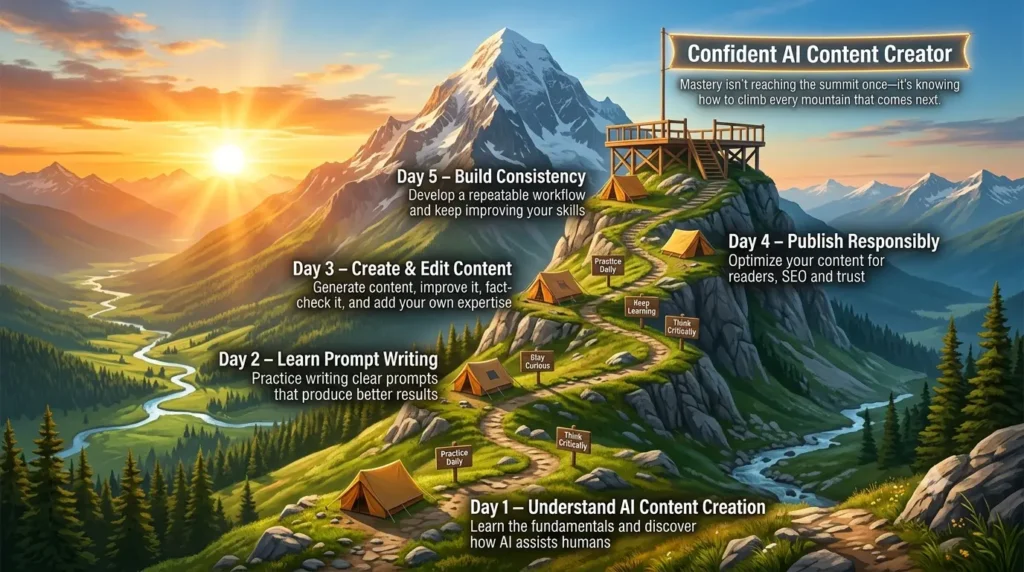
🎯 Your 5-Day AI Content Creation Action Plan
❓How Can You Start Using AI Today?
Learning AI content creation is valuable, but taking action is what builds real skills. Instead of trying to master everything at once, start with small, practical steps.
Here’s a simple 5-day plan designed for complete beginners.
📅 Day 1: Explore an AI Tool
Choose one AI tool, such as ChatGPT, and spend time exploring its features. Ask simple questions, generate ideas, and get comfortable with how it responds.
💡 Goal
Understand how AI works through hands-on practice.
📅 Day 2: Practice Writing Better Prompts
Experiment with different prompts for the same task. Notice how clearer instructions produce better results.
💡 Goal
Learn that better prompts lead to better content.
📅 Day 3: Create Your First Piece of Content
Use AI to draft a short blog post, email, or social media post. Then edit it by adding your own ideas and improving the language.
💡 Goal
Experience the complete AI-assisted writing process.
📅 Day 4: Review and Improve
Read your content carefully. Check for grammar, accuracy, readability, and originality. Make improvements wherever needed.
💡 Goal
Develop the habit of editing instead of publishing the first draft.
📅 Day 5: Publish and Learn
Share your content on your website, blog, or social media platform. Observe feedback and think about what you can improve next time.
💡 Goal
Build confidence through consistent practice.
📌 Key Takeaway
You don’t need to become an AI expert overnight. By practicing a little each day, you’ll gradually develop the skills to create high-quality, AI-assisted content with confidence.
💡 FTPLAYEZ™ Quick Recap
✔ Learn one AI tool first.
✔ Practice writing better prompts.
✔ Create, edit, and publish your content.
✔ Improve through consistent practice.
🔄 Smooth Transition
Congratulations! You now understand the complete AI content creation process—from the basics to practical applications.
Before we wrap up, let’s answer some of the most frequently asked questions that beginners have about AI content creation.
❓ Frequently Asked Questions About AI Content Creation
❓1. What is AI content creation?
AI content creation is the process of using artificial intelligence tools to help create, improve, or organize digital content such as blog posts, emails, social media captions, images, and video scripts. AI assists with the work, while humans provide creativity, accuracy, and final judgment.
❓2. Is AI-generated content legal?
Yes. Using AI to create content is generally legal. However, you are responsible for ensuring your content follows copyright laws, respects intellectual property, and does not contain false or misleading information.
❓3. Is AI-generated content plagiarism?
Not automatically. However, AI-generated content should always be reviewed, edited, and checked for originality before publishing. Adding your own insights and examples makes the content more unique and valuable.
❓4. Can AI replace human writers?
No. AI is a powerful assistant, but it cannot replace human creativity, critical thinking, personal experiences, or emotional storytelling. The best results come from collaboration between AI and humans.
❓5. Which AI tool should beginners start with?
If you’re new to AI, ChatGPT is an excellent starting point because it’s easy to use and supports a wide range of writing and learning tasks. As your skills grow, you can explore other tools based on your needs.
❓6. Can AI-generated content rank on Google?
Yes. AI-assisted content can rank well if it is accurate, original, helpful, and provides real value to readers. Human editing and fact-checking remain essential.
❓7. What is the biggest mistake beginners make?
The most common mistake is publishing AI-generated content without reviewing or improving it. Always edit, verify facts, and add your own knowledge before publishing.
❓8. How can I improve my AI content creation skills?
Practice regularly, write better prompts, experiment with different AI tools, study high-quality content, and keep refining your editing skills. Consistent practice is the fastest way to improve.
📌 Key Takeaway
AI content creation is a skill that improves with practice. The more you learn, experiment, and refine your workflow, the more valuable your content will become.
💡 FTPLAYEZ™ Quick Recap
✔ AI is a tool—not a replacement for human creativity.
✔ Always edit and fact-check AI-generated content.
✔ Focus on creating helpful, original, and trustworthy content.
🔄 Smooth Transition
You’ve reached the end of this complete beginner’s guide.
Let’s finish by reviewing the key lessons and discussing your next steps to continue growing your AI content creation skills.
🎓 Final Thoughts: Start Your AI Content Creation Journey Today
AI content creation is no longer a skill reserved for technology experts or professional marketers. Today, anyone with curiosity and a willingness to learn can use AI to create better content, work more efficiently, and explore new opportunities.
Throughout this guide, you’ve learned what AI content creation is, why it matters, how it works, the best tools to use, proven best practices, common mistakes to avoid, and how AI can support different types of creators. Most importantly, you’ve seen that AI works best when combined with human creativity, critical thinking, and expertise.
Remember, becoming skilled at AI content creation doesn’t happen overnight. Like any valuable skill, it improves through consistent practice and continuous learning. Start with one AI tool, experiment with different prompts, review your results, and keep refining your workflow.
If you’re serious about mastering AI, don’t stop here.
Our next guide, “AI Prompt Engineering: Templates, Frameworks & Systems,” will teach you how to write smarter prompts that produce higher-quality AI responses for blogging, marketing, business, and everyday productivity.
Thank you for reading this guide. We hope it has given you the confidence to begin your AI content creation journey. Keep learning, keep experimenting, and most importantly, create content that genuinely helps people.
📚 References & Further Reading
To ensure this guide is accurate and helpful, we recommend exploring these trusted resources for additional learning about AI, content creation, and search quality.
• Google Search Central – Creating Helpful, Reliable, People-First Content