You opened five tabs today. ChatGPT for a caption. Canva for a graphic. Another tab for that email you still haven’t sent. By 3 PM, you’ve used four different AI tools and somehow still feel behind.
Here’s the thing nobody tells beginners: you don’t need more AI tools. You need one skill.
Before publishing this guide, we didn’t want to rely on theory alone. We used the same content marketing workflow to plan, write, and reshape content into different formats ourselves. Some ideas worked immediately. Others needed editing and testing before they felt natural. That experience helped us identify a simple process that beginners can actually follow without feeling overwhelmed.
That’s exactly what you’ll learn in this guide . Not a list of 15 tools to get lost in. One framework, five content types, real results.
If you’ve ever stared at a blank content calendar wondering how anyone keeps up — this is where that stops.
Table of Contents
1. Why Most People Use AI for Content Marketing Wrong
2. What Is AI Content Marketing? (In One Sentence)
3. The One-Prompt-Five-Formats Framework™
4. How to Use AI to Write Blog Posts That Don’t Sound Robotic
5. How to Use AI for Social Media Content (Captions, Reels, Carousels)
6. How to Use AI for Email Marketing (Subject Lines, Sequences, Personalization)
7. How to Use AI for Ad Copy That Actually Converts
8. How to Use AI for Landing Pages & Product Descriptions
9. 5 Mistakes Beginners Make With AI Content Marketing
10. Best AI Tools for Each Content Type
11. How We Tested This Framework (E-E-A-T)
12. Frequently Asked Questions
13. Your Next Move: Build Your First AI Content Workflow
Why Most People Use AI for Content Marketing Wrong
Here’s a mistake we made in week one of testing this: we treated AI like five separate jobs.
One prompt for the blog. A different prompt for Instagram. Another for the email. Another for the ad. Each one written from scratch, with zero connection to the others.
Sound familiar?
It’s the most common trap beginners fall into — and honestly, most “AI marketing” tutorials teach it this way too. They show you how to write a blog with AI, then a separate tutorial for how to write social captions with AI, like these are unrelated skills.
Why This Happens
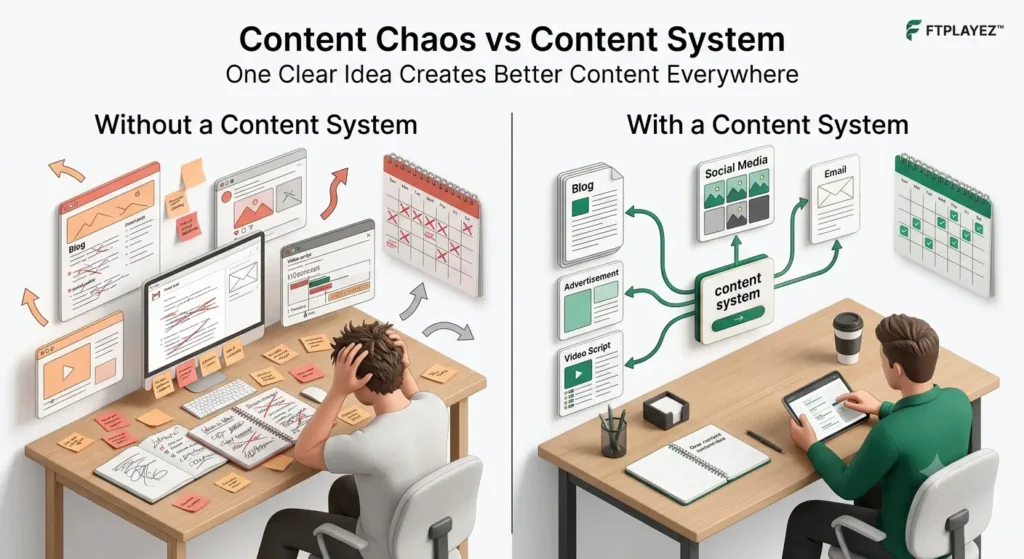
Most beginners don’t have a content system. They think every platform needs completely new ideas, so they start from zero each time. That creates more work, wastes time, and often leads to inconsistent messaging. The real goal isn’t creating more content—it’s creating one strong idea and adapting it for different platforms.
They’re not. They’re the same core content, reshaped five different ways.
Think about it like this: a chef doesn’t cook five completely different meals from five different recipes when a dinner service goes out. They prep one strong base — a sauce, a stock, a marinade — and build multiple dishes from it. Efficient. Consistent. Still high quality.
That’s exactly what’s missing from most AI content workflows. People burn hours re-explaining their brand, their audience, and their tone to AI five separate times — once per platform.
Then they wonder why the results feel disconnected, or why one caption sounds nothing like the blog it’s supposed to support.
The fix isn’t a better AI tool. It’s a better starting point.
One clear, detailed prompt — built once — that becomes the foundation for your blog, your social posts, your email, and your ad copy. Reshaped for each platform, but rooted in the same core message.
💡FTPLAYEZ™ Quick Tip
Before opening any AI tool, write down your main message in one sentence. If you can’t explain your idea clearly in one sentence, AI won’t magically make it clear either. A clear idea always comes before a great prompt.
That’s the framework we’re about to hand you.
What Is AI Content Marketing? (In One Sentence)
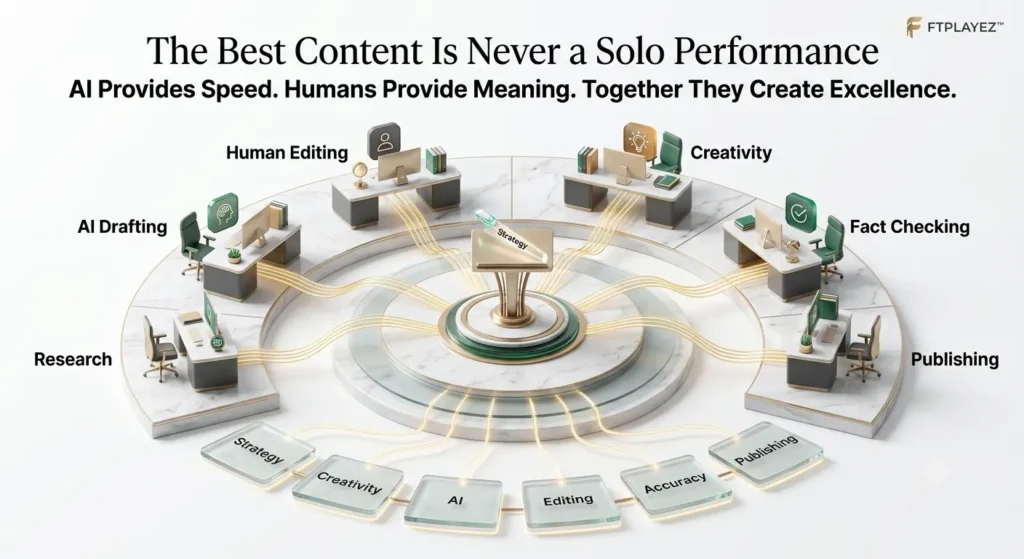
AI content marketing means using AI tools to plan, write, and adapt content — blogs, social posts, emails, ads — faster, while a human still shapes the strategy, tone, and final decisions.
That’s it. That’s the whole definition.
AI Content Marketing vs Traditional Content Marketing
| Traditional Content Marketing | AI Content Marketing |
| Brainstorm every idea manually | Generate ideas with AI, then refine them |
| Write every draft from scratch | Use AI for the first draft and improve it |
| Spend more time creating | Spend more time editing and improving |
| Difficult to create content consistently | Easier to maintain a regular publishing schedule |
| One piece of content at a time | Repurpose one idea into multiple content formats |
AI doesn’t replace creativity—it supports it. Think of AI as a creative assistant that helps you work faster, while you stay responsible for strategy, accuracy, and the final quality. The best results come from combining AI’s speed with human judgment.
No hype. No “revolutionary paradigm shift” language. Just a practical skill — the same way “using a calculator” is a skill, not a personality trait.
Here’s what it’s not:
• It’s not letting AI publish content untouched
• It’s not replacing your brand voice with a generic one
• It’s not “set it and forget it” automation
AI is the engine. You’re still the driver.
Beginners often assume AI content marketing means typing one sentence and getting a finished campaign. It doesn’t work that way — not yet, and honestly, not in a way you’d want it to.
The brands winning with AI in 2026 aren’t the ones publishing the most. They’re the ones using AI to move faster on the boring parts — first drafts, reformatting, repetition — so they have more time for the parts that actually need a human: strategy, judgment, and voice.
Keep that split in mind. It’s the difference between content that performs and content that gets ignored.
💡 FTPLAYEZ™ Quick Tip
Don’t judge AI by its first answer. The quality of the output usually improves after better prompts, editing, and a second round of refinement. Great content is rarely created in one attempt.
📌 Key Takeaway
AI Content Marketing isn’t about replacing human creativity. It’s about using AI to handle repetitive work so you can spend more time thinking, creating, and connecting with your audience.
The One-Prompt-Five-Formats Framework™
Why This Framework Saves So Much Time
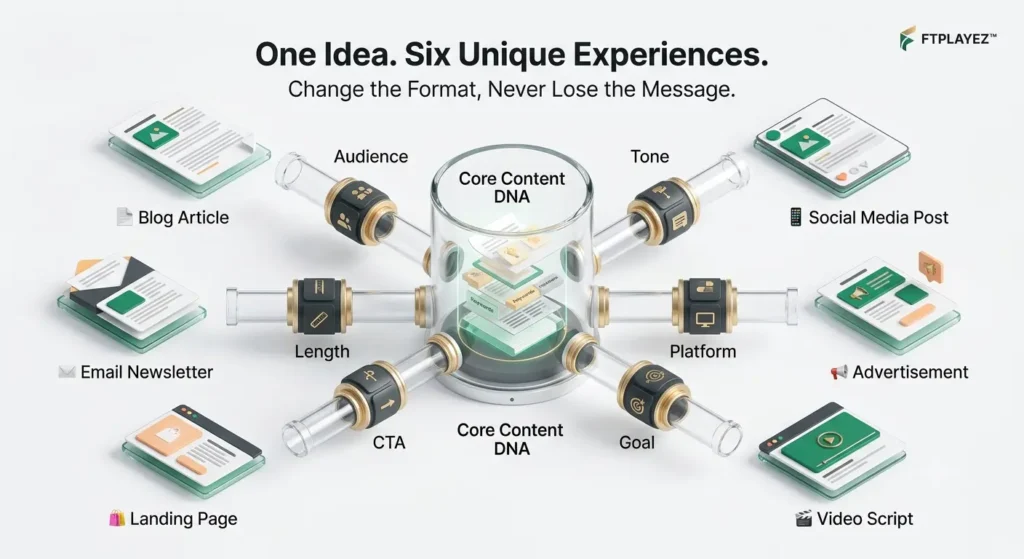
Most beginners create every piece of content from scratch. That means they spend hours thinking of new ideas for blogs, social media posts, emails, and ads. This framework solves that problem by starting with one strong idea and adapting it for different platforms. Instead of working harder, you work smarter while keeping your message consistent everywhere.
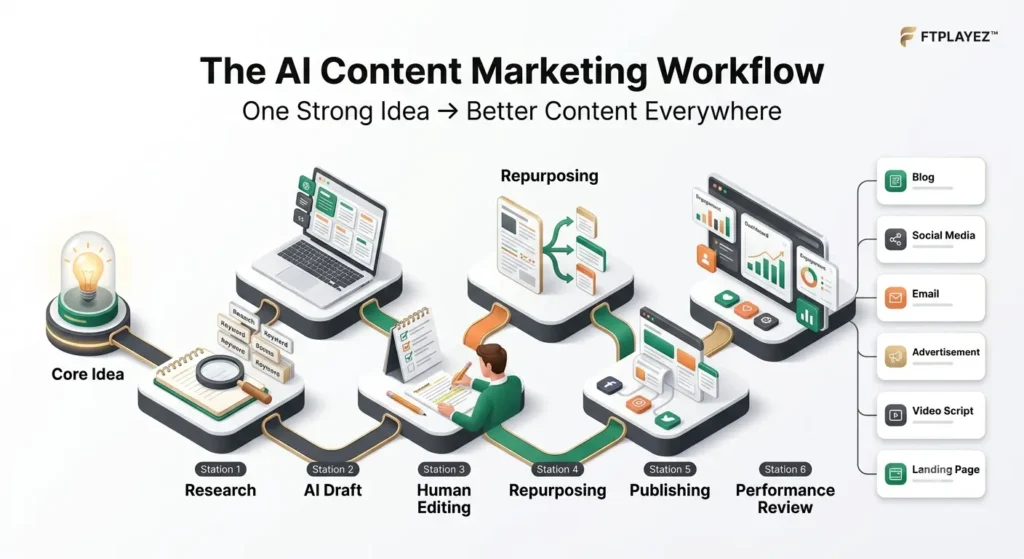
Here’s the framework we tested, refined, and now use for every piece of content at FTPLAYEZ™. Three layers. One starting point. Five outputs.
Where to Use Each Content Format
| Content Format | Best Used For | Main Goal |
| Blog | SEO & education | Build long-term traffic |
| Social Media Post | Engagement | Reach new audiences |
| Nurturing | Build relationships | |
| Advertisement | Promotion | Generate clicks or sales |
| Video Script | Education & branding | Increase watch time and trust |
💡 FTPLAYEZ™ Quick Tip
Don’t try to create five different ideas for five platforms. Create one valuable idea first, then reshape it to match each platform’s audience and style. This approach saves time and keeps your brand message consistent.
Layer 1: The Core Message Block
This is the one detailed prompt you write once. It includes:
• Who it’s for (your specific audience — not “everyone”)
• The one key message you want to land
• Your brand tone (casual, professional, playful — pick one)
• The goal (educate, sell, build trust, get a click)
Here’s a real example we used for this exact article:
“Audience: beginners just starting with AI content creation, overwhelmed by too many tools. Key message: one AI skill can replace five separate content tasks. Tone: friendly, direct, no jargon. Goal: build trust and get them to try the framework themselves.”
That’s it. That block becomes the DNA for everything else.
Layer 2: The Format Reshaping Layer
Now you take that same Core Message Block and ask AI to reshape it — one format at a time:
• “Turn this into a 150-word Instagram caption with a hook in the first line.”
• “Turn this into a 3-email welcome sequence.”
• “Turn this into a 30-word Google ad headline and description.”
Notice what didn’t change: the audience, the message, the tone. Only the shape changed.
This is the part most beginners skip — they re-explain their brand from scratch every time. You don’t have to. Reuse the block. Reshape the output.
Layer 3: The Human Edit Pass
This is the layer AdSense, Google, and honestly your own readers actually care about. AI gives you the shape. You give it the soul.
Before publishing anything, we check three things:
1. Does this sound like a real person said it? (cut robotic phrases, add a specific detail)Is anything factually shaky? (AI can be confidently wrong — verify it)Would I actually send/post this? (if you wouldn’t, don’t publish it)
2. Is anything factually shaky? (AI can be confidently wrong — verify it)
3. Would I actually send/post this? (if you wouldn’t, don’t publish it)
Skip this layer and your content looks like everyone else’s. Keep it, and the same framework produces work that still sounds like you.
⚠️ Common Beginner Mistake
Many beginners copy the same content to every platform without making any changes. Each platform has a different audience and style. Always adapt the wording, length, and format instead of simply copying and pasting.
📌 Key Takeaway
Great content marketing isn’t about creating more content. It’s about creating one valuable idea and presenting it in the right format for the right audience.
How to Use AI to Write Blog Posts That Don’t Sound Robotic
Start with your Core Message Block from the framework above. Then give AI a structure, not just a topic.
Instead of: “Write a blog about email marketing tips” — try: “Write a blog outline with 6 sections, each answering one specific question a beginner would search for about email marketing. Use my Core Message Block for tone and audience.”
Structure first. Words second. This one change fixes 80% of the “robotic AI blog” problem before you even start writing.
Here’s a mistake we see constantly: someone pastes a topic into AI, gets a wall of text back, and publishes it almost untouched. It reads exactly like what it is — unedited AI output.
Generic transitions. No real examples. Every sentence the same length.
We already covered exactly how to fix that — the specific techniques for making AI writing sound human — in How to Create High-Quality AI Content That Sounds Human.
That article is your deep-dive on this one skill. Here, we’re focused on where blog writing fits into the bigger five-format system.
The short version: use AI for the first draft and structure. Use yourself for the specific details, the real opinion, and the sentence that only you would write. That one sentence — a genuine take, a small story, a number from your own experience — is usually what separates a blog that ranks from one that doesn’t.
Quick Blog Writing Checklist
Before you publish an AI-written blog, ask yourself these questions:
| Check | Yes / No |
| Does the introduction grab attention? | ☐ |
| Does every heading answer one clear question? | ☐ |
| Did I remove robotic phrases? | ☐ |
| Did I fact-check important information? | ☐ |
| Does the article sound like my own brand? | ☐ |
| Would I confidently publish this under my own name? | ☐ |
If you answered “No” to even one question, spend a few more minutes editing before publishing. A short editing session can improve trust much more than writing another draft.
How to Use AI for Social Media Content (Captions, Reels, Carousels)
Social media is where the “reshape, don’t rewrite” rule pays off fastest. One Core Message Block can become a week’s worth of content in minutes — if you ask for the right things.
For captions: “Turn my Core Message Block into a 100-word Instagram caption. Hook in the first line. End with a question to drive comments.”
For Reels/short-form video scripts: “Turn this into a 30-second Reel script with a spoken hook, 3 quick points, and a call-to-action. Write it like I’m talking to a friend, not presenting.”
For carousels: “Break this into a 5-slide carousel. Slide 1 is the hook. Slides 2-4 are one point each. Slide 5 is the takeaway + CTA.”
Here’s the beginner trap: asking AI for “a social media post” with no format specified. You’ll get something generic that fits nowhere.
Always name the exact format and platform — a LinkedIn post and a TikTok caption should never sound the same, even from the same core idea.
One more thing worth knowing: platforms reward specificity, not polish. A caption that says “AI helped me save 3 hours this week” outperforms a caption that says “AI content marketing is transforming businesses everywhere.
” Same tool, wildly different result — because one sounds like a person, and the other sounds like a press release.
Run every caption through Layer 3 of the framework — the Human Edit Pass — before it goes live.
That’s the step that keeps five different pieces of content from all sounding identical.
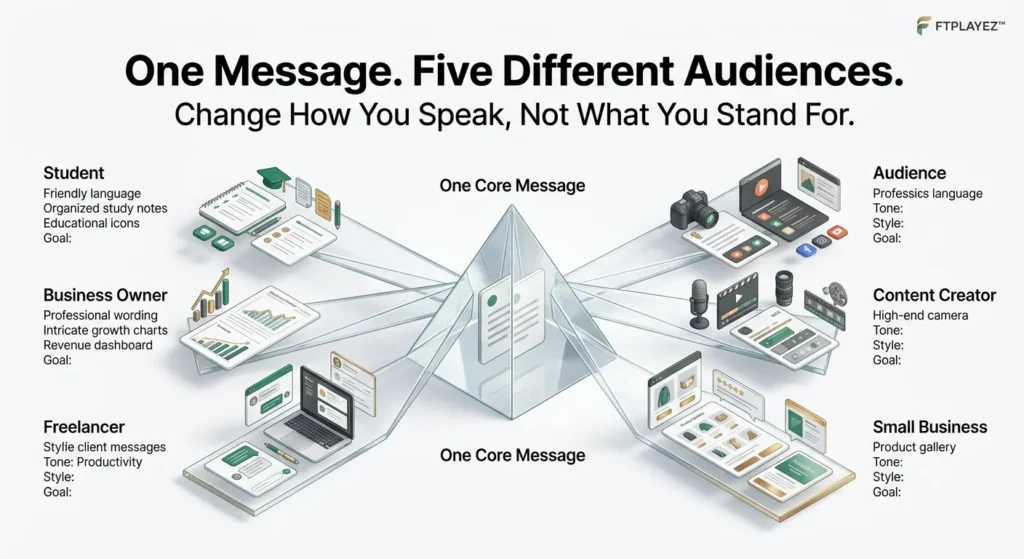
Choose the Right Style for Each Platform
Even if your main message stays the same, every platform has a different audience and content style.
| Platform | Best Style | Recommended Length | Main Goal |
| Friendly, visual, conversational | Short | Engagement | |
| Professional and educational | Medium | Build authority | |
| Storytelling and community-focused | Medium | Encourage discussion | |
| X (Twitter) | Concise and impactful | Very Short | Share quick insights |
| Search-focused and inspiring | Short | Drive website traffic |
Remember: Don’t copy and paste the same post everywhere. Adapt the tone, length, and formatting to match each platform while keeping your core message consistent.
How to Use AI for Email Marketing (Subject Lines, Sequences, Personalization)
Email is where AI content marketing quietly saves the most time — because most emails follow a pattern anyway. A welcome sequence. A product update. A re-engagement nudge. AI is excellent at patterns.
Subject lines first. This is the highest-leverage move in email marketing — a great email with a weak subject line never gets opened. Try:
“Give me 8 subject line options for this email, using my Core Message Block for tone. Mix curiosity, urgency, and directness — no clickbait.”
Test a few. Notice which style fits your brand before you settle on one pattern long-term.
For sequences: Instead of writing three separate emails from scratch, ask AI to build the whole arc at once:
“Turn my Core Message Block into a 3-email welcome sequence. Email 1: introduce and build trust. Email 2: show a real example or story. Email 3: soft call-to-action.”
This keeps the emails connected — same voice, same message, building on each other — instead of feeling like three unrelated messages that happened to land in the same inbox.
Personalization is where beginners overcomplicate things.
You don’t need complex segmentation to start. Even something simple — referencing what someone downloaded, or where they are in their journey — makes an email feel written for them instead of at them.
Ask AI: “Rewrite this email for someone who just downloaded our free guide but hasn’t taken the next step yet.”
One rule that matters more than any prompt: never let AI write your actual send-worthy subject line and body without reading it out loud first. Email is intimate — it lands in someone’s personal inbox.
If a line sounds off when spoken, it’ll feel off when read.
Common Types of Marketing Emails
| Email Type | Best Used For | Example Goal |
| Welcome Email | Introduce new subscribers | Build a strong first impression |
| Newsletter | Share updates, tips, or new blog posts | Keep your audience engaged |
| Promotional Email | Announce products, offers, or discounts | Increase sales or conversions |
| Follow-up Email | Continue a conversation after a download or purchase | Build trust and encourage the next step |
| Re-engagement Email | Reach inactive subscribers | Bring readers back to your content |
FTPLAYEZ™ Tip
Choose one clear goal before asking AI to write an email. A welcome email should feel different from a sales email, and a newsletter should educate before it promotes. When AI understands the purpose of the email, the output becomes much more relevant and useful.
How to Use AI for Ad Copy That Actually Converts
Ad copy has one job: stop the scroll.
That means no room for fluff. Every word has to earn its place.
Start with your Core Message Block. Then ask AI for something specific:
“Turn this into 5 Google ad headlines (max 30 characters) and 2 descriptions (max 90 characters). Focus on the one benefit that matters most.”
Notice the constraints. Character limits force clarity.
For social ads, try this instead:
“Write 3 Facebook ad variations. Each should open with a different hook style — a question, a bold claim, and a relatable problem.”
Why three? Because you don’t know which hook wins until you test it.
Here’s the beginner mistake: writing one ad and hoping it works.
The AI-assisted way is different. Generate five. Test two. Keep the winner.
One more thing. Ads are not the place for personality-heavy writing. Save the charm for your captions.
Here, clarity beats cleverness. Every time.
Ad Copy Checklist Before You Publish
| Question | Check |
| Does the first line grab attention? | ☐ |
| Is the main benefit clear? | ☐ |
| Is there only one main message? | ☐ |
| Is the CTA specific and easy to understand? | ☐ |
| Would you click this ad yourself? | ☐ |
FTPLAYEZ™ Insight: Great ads don’t try to say everything. They focus on one problem, one solution, and one clear action.
How to Use AI for Landing Pages & Product Descriptions
Landing pages have a different job than blogs or social posts. They exist to convert, not to entertain. Every section needs a clear purpose.
Start with your Core Message Block, then ask AI to build the page skeleton first:
“Create a landing page outline: headline, subheadline, 3 benefit sections, one testimonial placeholder, and a closing CTA. Use my Core Message Block for tone and audience.”
Getting the skeleton first avoids the most common mistake — writing paragraphs before you know what the page actually needs to say.
For product descriptions, specificity wins every time. Vague AI output sounds like every other product page online.
Instead of “quality materials,” ask AI to describe the actual material, size, or use case you provide. Feed it real details, not just a product name.
“Write a 60-word product description using these details: [list 3-4 real features]. Focus on the benefit each feature gives the customer.”
One rule matters most here: your CTA button text should never be generic.
“Submit” and “Click Here” convert worse than something specific like “Start My Free Guide” or “Get My Framework.”
Small detail. Big difference in click-through.
Simple Landing Page Structure
| Section | Purpose |
| Headline | Grab attention immediately |
| Sub-headline | Explain the main benefit |
| Benefits | Show why the offer matters |
| Social Proof | Build trust with testimonials or reviews |
| Call-to-Action | Tell the visitor exactly what to do next |
FTPLAYEZ™ Tip: Before asking AI to write a landing page, decide the page’s single goal. A page with one clear objective almost always performs better than one trying to do everything.
5 Mistakes Beginners Make With AI Content Marketing
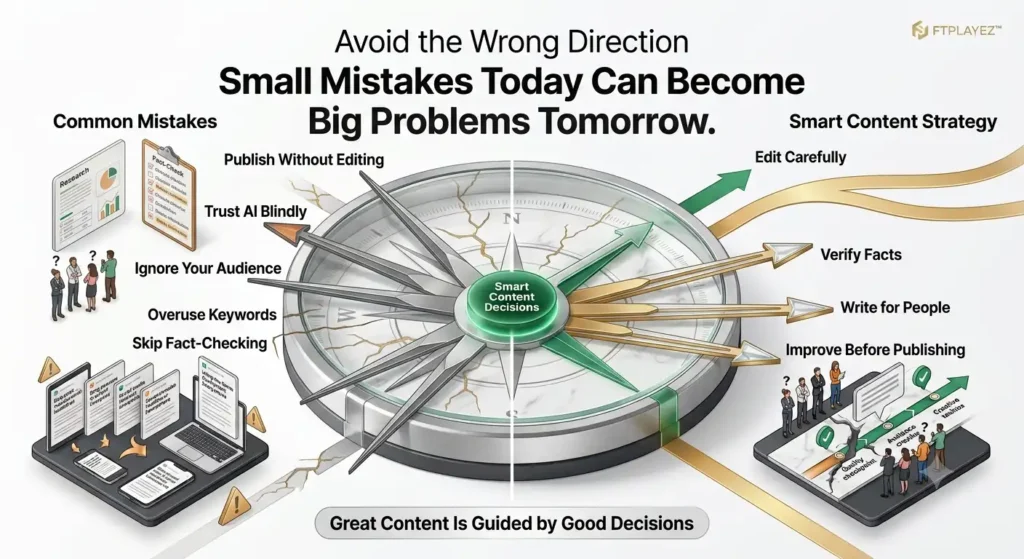
We made most of these ourselves before figuring out what actually works. Learn from the shortcuts we didn’t take the first time.
1. Re-explaining your brand every single time.
This is the mistake that started this whole framework. One detailed Core Message Block saves hours across every format.
2. Publishing the first draft.
AI drafts are a starting point, not a finish line. Skip the Human Edit Pass and it shows immediately.
3. Using the same content for every platform.
A LinkedIn post copy-pasted to Instagram feels off to both audiences. Reshape, don’t reuse.
4. Ignoring factual accuracy.
AI can sound completely confident while being completely wrong. Always verify numbers, claims, and quotes before publishing.
5. Losing your voice completely.
If ten competitors used the same AI tool with the same prompt, would your content sound identical to theirs? If yes, something’s missing.
The fix for all five is the same: treat AI as your first draft partner, not your final decision-maker.
That one mindset shift is what separates content that builds trust from content that quietly gets ignored.
Quick Self-Assessment
Before publishing your next AI-generated content, ask yourself:
☐ Did I edit the AI’s first draft instead of publishing it immediately?
☐ Does the content sound like my brand and not just like AI?
☐ Did I fact-check important claims and statistics?
☐ Is the content written for my audience, not just for search engines?
☐ Does every section provide clear value to the reader?
If you checked all five, you’re already avoiding the most common beginner mistakes.
Best AI Tools for Each Content Type
Different formats need different strengths. Here’s what we found works best for each, based on what we tested for this guide.
| Content Type | Best AI Tool | Why It Works |
| Blog Writing | ChatGPT / Jasper | Strong at long-form structure and outlines |
| Social Captions | Copy.ai / OwlyWriter | Built for short, punchy, platform-specific copy |
| Email Sequences | ChatGPT + Mailchimp AI | Good at connected multi-email arcs |
| Ad Copy | Copy.ai | Trained specifically on high-converting short copy |
| Visuals/Graphics | Canva AI | Turns text prompts into on-brand designs fast |
| Editing/Polish | Grammarly | Catches robotic tone before you publish |
One important note: tools change fast. What matters more than which app you pick is the framework you feed it — the Core Message Block. A great tool with a weak prompt still produces weak content.
Pick one tool per content type. Master the prompt. Switch tools later if you need to — the skill transfers.
How We Tested This Framework (E-E-A-T)
Before writing this guide, we ran the framework ourselves. Not in theory — in practice, on real content, for this exact article.
Here’s what that looked like.
Week one: we treated every format separately, just like most beginners do. Five prompts, five unrelated outputs. It took hours, and the pieces didn’t feel connected.
Week two: we built one Core Message Block and reshaped it across formats instead. Same message, five shapes. The time dropped significantly. The content felt consistent for the first time.
What surprised us: ad copy needed the heaviest editing. Blog outlines needed the least. Email subject lines took the most trial and error to get right.
We’re sharing that honestly instead of pretending every format was equally easy. Real testing looks messy before it looks clean.
This matters beyond just this article. Trustworthy content should show its work — not just claim a method works, but show where it struggled too.
That’s the standard every FTPLAYEZ™ guide is built on. Tested first. Written second.
Frequently Asked Questions
1. Do I need to be a writer to use AI content marketing?
No. The framework works regardless of writing experience — AI handles structure, you handle judgment and final edits.
2. How much time does this actually save?
In our testing, reshaping one Core Message Block across five formats took a fraction of the time of writing each one separately — often cutting the work down by more than half.
3. Will AI content hurt my SEO rankings?
Not if it’s edited, accurate, and adds real value. Google penalizes low-effort, unedited content — not AI use itself.
4. Can I use this framework with any AI tool?
Yes. The framework isn’t tool-specific. It works with ChatGPT, Jasper, Copy.ai, or any AI writing assistant.
5. What’s the biggest mistake beginners make?
Publishing AI’s first draft without a human edit pass. That one skipped step is usually what makes content feel robotic.
Your Next Move: Build Your First AI Content Workflow
You don’t need to master everything in this guide today. You need to do one thing.
Write your first Core Message Block. Just one. For one topic you’re already planning to create content about this week.
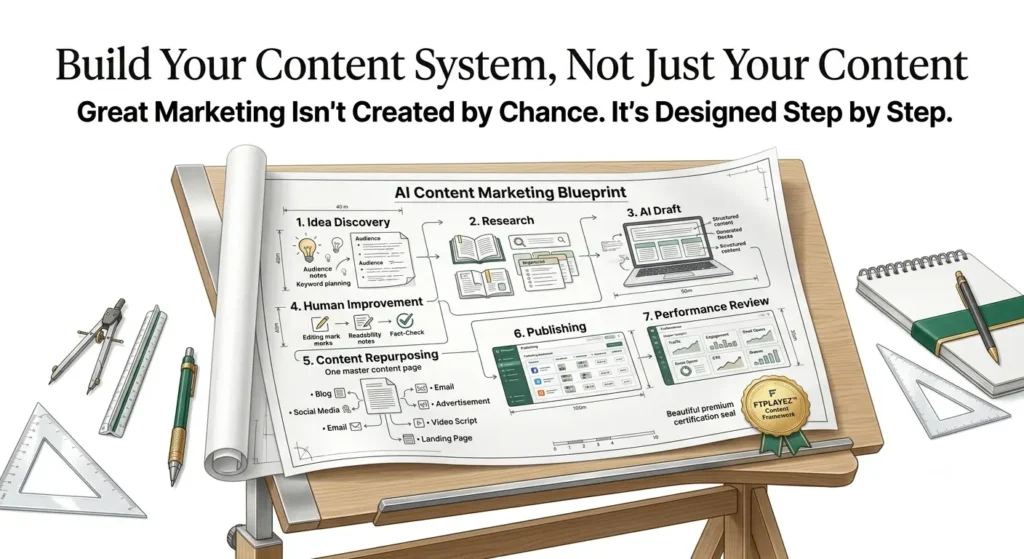
Once you have it, pick a single format to test — maybe your next Instagram caption, or your next email. Run it through all three layers: Core Message, Reshape, Human Edit Pass.
Notice how different it feels compared to writing that same content from scratch, format by format, the old way.
That’s the shift this whole guide is really about. Not “using more AI.” Using AI smarter — one strong foundation, reshaped everywhere it needs to go.
Here’s what’s next in this series. If you haven’t already, start with AI Content Creation: The Complete Beginner’s Guide — our flagship guide that lays out the full foundation this article builds on.
If you want to go deeper on making AI content sound genuinely human — not just this framework, but the actual writing techniques — read How to Create High-Quality AI Content That Sounds Human.
And once you’ve tried this framework on a few pieces, the next step is putting it all together into one repeatable system. That’s exactly what we cover in our upcoming guide: The Complete AI Content Creation Workflow: From Idea to Published Content.
One prompt. Five formats. Real results — because you tested it yourself, not because we told you to trust it.
That’s the difference between content that gets published and content that actually gets read.
Your Next Step
Don’t try to master every AI tool this week.
Instead, choose one real content project—a blog post, an email, a social media post, or a landing page—and apply the techniques you learned in this guide. The more you practice, the better you’ll understand where AI helps and where your own creativity makes the biggest difference.
AI content marketing isn’t about replacing human ideas. It’s about giving those ideas a faster and more efficient way to reach the people who need them.