Struggling to get good results from ChatGPT?
This guide will show you exactly how to turn weak prompts into powerful, high-quality outputs step-by-step.
📌 Save this guide — you’ll use these prompts again and again.
📍 Table of Contents
1. Introduction
3. Why Most Prompts Fail (And How We Fix That)
4. The Anatomy of a High-Performing Prompt
7. The Prompt Optimization Loop: How Professionals Continuously Improve AI Output
8. Advanced Power User Techniques
9. The Mega-Prompt Breakdown (Real Advanced Example)
10. Industry-Specific Use Case Library (Expanded Authority Section)
11. ChatGPT vs Claude vs Gemini (Professional Comparison)
12. The Golden Rule: Trust, But Verify
13. How to Turn This Page Into a Bookmark Resource
14. Frequently Asked Questions
15. Final Authority Conclusion
🏁 Introduction
Most people think ChatGPT gives inconsistent answers.
It doesn’t.
Most of the time, the problem isn’t the AI — it’s the prompt.
If you give vague instructions, you get vague results.
If you ask like it’s a search engine, you get generic output.
If you don’t define context, tone, or constraints, the AI has to guess.
And guessing leads to average results.
ChatGPT is not just a chatbot.
It’s a reasoning engine. A pattern recognizer. A structured thinker.
But it performs at its highest level only when you communicate with clarity.
That’s where most users fail.
They write one-line prompts.
They expect expert-level answers.
They get disappointed.
Professionals do something different.
They structure their prompts.
They assign roles.
They define outcomes.
They refine outputs.
And the results are dramatically better.
This guide is not just a list of “20 prompts.”
It is a complete prompt mastery system.
Inside this article, you’ll discover:
• 20+ real, high-performing prompt templates
• The anatomy of a powerful prompt
• Frameworks professionals use daily
• Industry-specific use cases
• Advanced power-user techniques
• Optimization loops that improve AI output continuously
• A professional comparison of ChatGPT, Claude, and Gemini
By the end of this guide, you will not just copy templates.
You will understand how to design prompts strategically.
You will know how to turn weak responses into strong ones.
How to modify templates for any situation.
How to think like a prompt engineer.
If you want better results from AI, the solution isn’t more tools.
It’s better instructions.
Let’s build them.
👉 New to prompts? Start with my beginner guide to understand the basics.
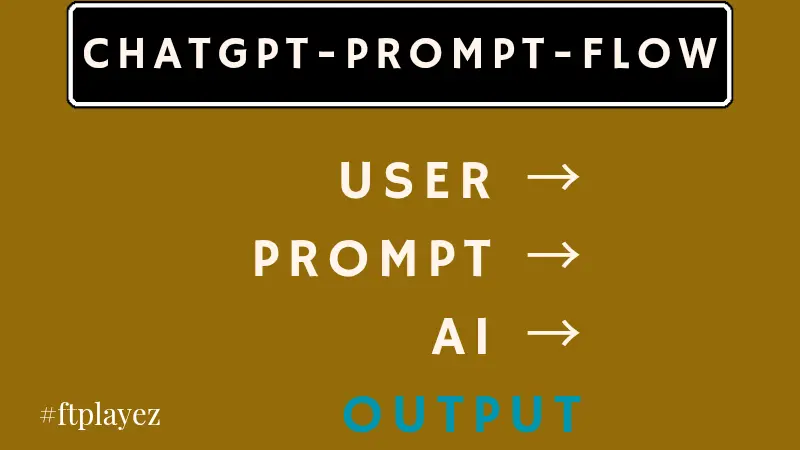
😟 Stop Writing Weak Prompts.
Most beginners try ChatGPT once, get a mediocre answer, and think:
“AI is overrated.”
But the truth is simple.
ChatGPT is only as good as your instructions.
Vague prompts create vague answers.
Generic inputs create generic outputs.
Unclear expectations create messy results.
This guide fixes that.
Below, you’ll find 20 real, high-performing prompt templates organized by category. These aren’t random one-liners. Each one includes:
• When to use it
• A ready-to-copy template
• Why it works
• How to refine it
Save this page. You’ll come back to it again and again.
💡 Pro Tip: Always define your audience before writing a prompt. Clear audience = better results.
👉 New to prompt writing? Start here →
📌 Why Most Prompts Fail (And How We Fix That)
Before we jump into examples, understand this:
Most prompts fail because they lack:
1. Clear role assignment
2. Context
3. Constraints
4. Desired format
5. Tone control
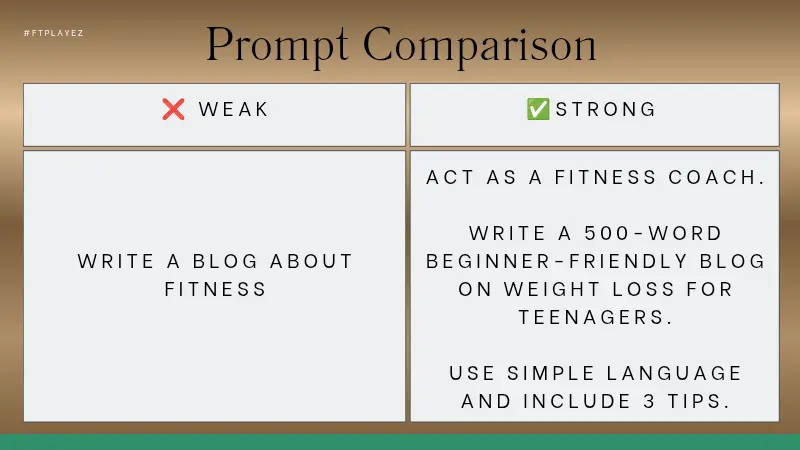
Instead of saying:
“Write a blog post about fitness.”
We say:
“Act as a certified fitness coach. Write a 800-word beginner-friendly blog post explaining home workouts for busy professionals. Include 5 practical tips and a motivational closing paragraph.”
See the difference?
Now let’s move into real templates.
**Weak prompts create confusion. Clear prompts create control.**
⚠️ Common Mistake: Most beginners write one-line prompts and expect perfect output. ChatGPT needs direction, not guesses.
👉 Still getting bad results? Fix your mistakes here →
💯 The Anatomy of a High-Performing Prompt
Before using the 20 templates, readers must understand why they work.
The 5 Building Blocks of Powerful Prompts
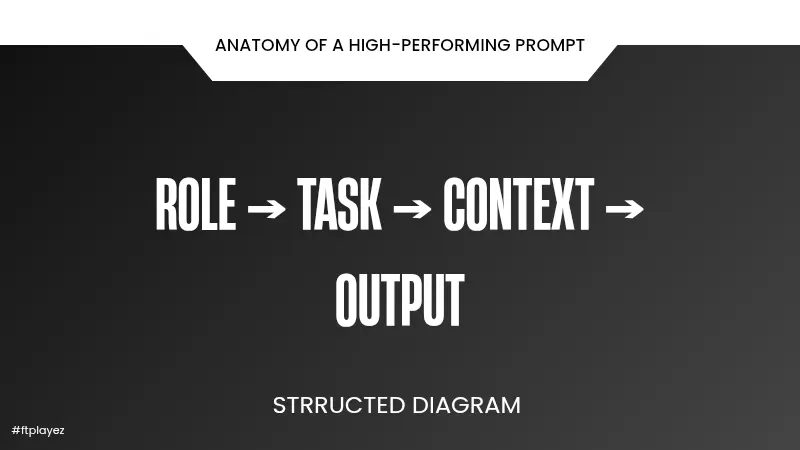
Every high-quality prompt in this article follows this structure:
1️⃣ Role Assignment
“Act as a senior marketing strategist…”
Why it matters:
It narrows the AI’s thinking pattern. Instead of generic output, you get domain-specific intelligence.
2️⃣ Clear Objective
“I need to write a persuasive landing page…”
Without a defined goal, the AI guesses.
3️⃣ Context
“Target audience: first-time entrepreneurs…”
Context prevents generic responses.
4️⃣ Constraints
“Keep it under 150 words.”
“Use bullet points.”
“Tone: formal but friendly.”
Constraints create precision.
5️⃣ Output Format
“Provide a table.”
“Use numbered sections.”
“End with a call-to-action.”
Format control makes output usable immediately.
This framework alone elevates your entire blog to authority level.
**The quality of your prompt decides the quality of your result.**
🚀 Quick Win: Use Role + Task + Context in every prompt. This alone can improve your results instantly.
👉 Want to go deeper into structured prompting systems? Explore →
🦘 Jump to Section
• 🔥The Refinement Secret (Elite Upgrade)
📝 A. Writing & Content Creation
🟢 1. Blog Post Outline Generator
🎯 When to Use This
When you need structure before writing a full article.
📋 Copy-Paste Template
Act as an experienced content strategist.
Create a detailed blog outline about [topic].
Target audience: [describe audience].
Goal: [inform / persuade / rank for SEO].
Include:
- A strong introduction hook
- At least 6 H2 sections
- Bullet points under each section
- A conclusion with a call to action
⚡ Why This Works
You define:
• Role (content strategist)
• Audience
• Goal
• Structure expectations
That forces organized output.
🟢 2. Social Media Caption Generator
Act as a social media marketing expert.
Write 5 engaging Instagram captions about [topic].
Tone: energetic and relatable.
Include emojis.
End each caption with a question to increase engagement.
Why it works:
• Clear platform
• Defined tone
• Engagement trigger
🟢 3. YouTube Script Creator
Act as a YouTube scriptwriter.
Create a 5-minute video script about [topic].
Audience: beginners.
Include:
- Hook in first 15 seconds
- 3 main points
- Practical examples
- Strong closing CTA
This forces structure and viewer retention.
🟢 4. Product Description Generator
Act as a professional copywriter.
Write a persuasive product description for [product].
Target audience: [describe audience].
Highlight:
- 3 main benefits
- Emotional appeal
- Problem it solves
Keep it under 200 words.
Benefit-driven. Clear constraint. High conversion.
💼 B. Business & Marketing
🟢 5. Cold Email Outreach Template
Act as a B2B sales expert.
Write a short cold email to [target audience].
Offer: [your service].
Keep it under 120 words.
Make it personalized and non-salesy.
End with a soft call to action.
Short + specific = higher response.
🟢 6. Sales Page Headline Generator
Generate 15 high-converting headline ideas for a [product].
Target audience: [who].
Focus on benefits, urgency, and clarity.
Avoid clickbait.
Volume creates better options.
🟢 7. Responding to a 1-Star Review
Act as a customer service professional.
Write a polite and empathetic response to a 1-star review.
Acknowledge the issue.
Offer a solution.
Maintain brand reputation.
Protects your business credibility.
🟢 8. Ad Copy Generator
Act as a Facebook Ads copywriter.
Write 3 ad variations for [product].
Audience: [who].
Pain point: [problem].
Include a clear call to action.
Keep under 150 words each.
Focused and structured.
🎓 C. Students & Learning
🟢 9. Complex Topic Simplifier
Explain [topic] as if teaching a 12-year-old.
Use simple language.
Provide real-world examples.
Avoid technical jargon.
Perfect for exam preparation.
🟢 10. Study Plan Creator
Create a 30-day study plan for learning [subject].
Time available per day: [X hours].
Include weekly goals and revision days.
Actionable and structured.
🟢 11. PDF Summary Assistant
Summarize the following text.
Provide:
- Key points
- Important definitions
- 5 revision questions
Text: [paste content]
Turns reading into active learning.
🟢 12. Flashcard Generator
Create 20 flashcards for [topic].
Format:
Q:
A:
Keep answers concise.
Instant revision tool.
💻 D. Coding & Tech
🟢 13. Debug Code
Act as a senior Python developer.
Identify errors in this code and explain them clearly.
Suggest corrections.
Code:
[paste code]
Explanation + fix = learning.
🟢 14. Line-by-Line Code Explanation
Explain this code line-by-line.
Use beginner-friendly language.
Code:
[paste code]
Builds foundational understanding.
🟢 15. Simple Website Generator
Create a basic HTML + CSS landing page for [purpose].
Include:
- Header
- Feature section
- Contact form
Keep code clean and commented.
Clear output expectation.
🟢 16. API Request Example
Show a sample API request using Python for [API name].
Include authentication example.
Explain each part briefly.
Practical and educational.
🚀 E. Productivity & Personal Use
🟢 17. Weekly Planning Template
Create a weekly productivity planner.
Include:
- Top 3 priorities
- Daily breakdown
- Reflection section
Format as a clean table.
Organized output.
🟢 18. Habit Tracker Plan
Design a 30-day habit-building plan for [habit].
Include:
- Daily actions
- Tracking method
- Motivation tips
Behavior-focused.
🟢 19. Brainstorming Ideas
Generate 25 creative ideas for [goal].
Mix practical and unconventional ideas.
Avoid repetition.
Volume = creativity boost.
🟢 20. Decision Comparison Table
Compare [Option A] and [Option B].
Create a pros and cons table.
Include cost, benefits, risks, long-term impact.
Provide a final recommendation.
Structured decision-making.
🔥 The Refinement Secret (Elite Upgrade)
Here’s what most beginners never do.
They stop after the first output.
Power users don’t.
They chain prompts.
Example:
After receiving your email:
“Now rewrite this to be 30% shorter and more persuasive.”
Or:
“Add stronger emotional appeal.” “Make it more formal.” “Turn this into bullet points.”
This process is called iterative prompting.
It turns average results into premium results.
🖼️ How to Modify Any Template
Every prompt here follows a formula:
Role
Task
Context
Constraints
Format
If you change just one of those elements, the output changes dramatically.
Example:
“Write a blog outline.”
Say:
“Act as an SEO strategist and create an outline targeting beginners interested in passive income.”
See the difference?
Precision equals performance.
🔥 The Prompt Optimization Loop: How Professionals Continuously Improve AI Output
Most beginners think prompting is a one-time action.
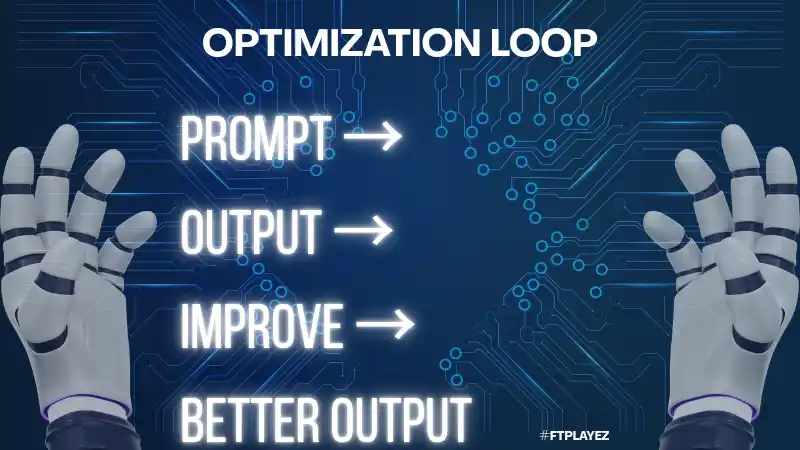
Professionals treat it as a refinement loop.
Here is the elite-level process used by advanced users:
Step 1️⃣: Generate the First Draft
Use a structured prompt (like the templates above).
Do not aim for perfection.
Aim for direction.
Step 2️⃣: Diagnose Weaknesses
Instead of rewriting manually, ask the AI:
Analyze the previous output.
What are its weaknesses in clarity, persuasion, and structure?
Be specific.
This forces meta-analysis.
Step 3️⃣: Upgrade With Constraints
Now refine with precision:
Rewrite this content.
Improve clarity.
Reduce fluff by 20%.
Increase persuasive tone slightly.
Use shorter sentences.
Notice the specificity.
We’re not saying “make it better.”
We’re defining how it should be better.
Step 4️⃣: Stress-Test the Output
Ask:
If you were a skeptical reader, what would you criticize about this?
How can it be improved?
This creates defensive strength in your content.
Step 5️⃣: Format for Use
Finally:
Convert this into a clean table.
Add bullet points.
Make it scannable for web readers.
Now the content becomes publish-ready.
**Professionals don’t write one prompt — they refine until it works.**
💡 Pro Tip: Never stop at the first output. Refine, improve, and iterate for better results.
🔋 Advanced Power User Techniques
This separates casual users from serious operators.
1️⃣ Chain-of-Thought Prompting
Add this line:
“Let’s think step-by-step.”
Why it works: It forces logical reasoning and reduces errors.
Example:
Solve this business case problem.
Let’s think step-by-step.
Explain your reasoning clearly.
Outputs become more structured and analytical.
2️⃣ Perspective Shifting
Add:
“Now analyze this from the perspective of a skeptical investor.”
Instantly changes depth.
3️⃣ Tone Percentage Control
Instead of saying: “Make it more professional.”
Say: “Make it 40% more formal and reduce casual language.”
Precision = control.
4️⃣ Self-Critique Prompt
After receiving output:
Review your previous response.
Identify weaknesses.
Suggest improvements.
Then provide an optimized version.
This is elite-level prompting.
Most people never do this.
👉 Want to use ChatGPT for real-world results like SEO and content? Check this →
📣 The Mega-Prompt Breakdown (Real Advanced Example)
Let’s analyze a serious prompt.
Goal: Create a 30-Day Social Media Plan
The Mega-Prompt
Act as a digital marketing strategist.
Create a 30-day Instagram content calendar for a fitness coaching business.
Target audience: busy professionals aged 25-40.
Goals: brand authority + lead generation.
Content mix:
- Educational posts
- Motivational posts
- Client testimonials
- Soft promotion posts
Provide:
- Daily topic
- Caption idea
- Suggested CTA
- Content type (Reel, Carousel, Post)
Format as a clean table.
Breakdown
Role → Digital marketing strategist
Context → Fitness coaching + specific audience
Goal → Authority + leads
Constraints → Content mix categories
Format → Clean table
The result is not random content.
It’s strategic content.
📚 Industry-Specific Use Case Library (Expanded Authority Section)
Now we go beyond generic prompts.
This is where beginners become professionals.
👨🎓 For Students & Researchers
Use Case: Summarizing a 50-Page Research Paper
Act as an academic research assistant.
Summarize the following paper into:
- Key thesis
- Supporting arguments
- Methodology
- Conclusion
- 5 potential exam questions
Use simple language.
Text:
[paste content]
Why this works: It transforms passive reading into active revision.
🛒 For Small Business Owners
Use Case: Writing a Product Launch Email
Act as an e-commerce marketing expert.
Write a launch email for [product].
Audience: existing customers.
Highlight urgency and limited-time bonus.
Tone: confident but not pushy.
Include subject line options.
This directly impacts revenue.
✍️ For Creative Writers
Use Case: Breaking Writer’s Block
Generate 10 “What if…” plot ideas for a thriller novel.
Each idea should include:
- Main character
- Conflict
- Unique twist
Keep each under 80 words.
Instead of waiting for inspiration, you engineer it.
✍️ For Creative Writers
Use Case: Learning Through Error
Explain this error message clearly:
[paste error]
What caused it?
How do I fix it?
How do I prevent it in the future?
That last line builds deep understanding.
⚖️ ChatGPT vs Claude vs Gemini (Professional Comparison)
Understanding models builds authority.
While prompting logic stays consistent, models respond differently.
ChatGPT
Strengths:
• Structured reasoning
• Coding
• Business logic
• Analytical tasks
Claude
Strengths:
• Long-form writing
• Creative storytelling
• Deep contextual memory
Gemini
Strengths:
• Research-style answers
• Integration with search-style queries
Key Insight: Good prompts work everywhere — but you may adjust tone and detail based on platform strengths.
💛 The Golden Rule: Trust, But Verify
AI is powerful.
But it can make mistakes.
Always:
• Fact-check statistics
• Verify citations
• Double-check legal or medical information
• Cross-reference critical claims
Professional users never blindly copy.
They review, refine, validate.
This protects your credibility.
And builds trust with readers.
📝 How to Turn This Page Into a Bookmark Resource
Encourage readers to:
• Save templates
• Modify placeholders
• Create their own prompt library
• Track which prompts perform best
This transforms passive reading into active usage.
**ChatGPT is not smart or dumb — it simply reflects how you ask.**
🚀 Quick Win: If your output is bad, don’t blame AI. Fix your prompt and try again.
❓ Frequently Asked Questions
❓ What is prompt engineering in simple words?
Prompt engineering means writing clear and structured instructions so AI gives better results. The better your prompt, the better the output you get.
❓ Why does ChatGPT sometimes give wrong answers?
Because the prompt is unclear or missing context.ChatGPT depends on your input — weak prompts lead to weak or confusing results.
❓ What is the best structure for a ChatGPT prompt?
A simple structure is:Role → Task → Context → OutputThis helps ChatGPT understand exactly what you want.
❓ What is prompt chaining and why is it important?
Prompt chaining means improving your result step-by-step instead of using one big prompt.It helps you get more accurate and detailed outputs.
❓ Can I use the same prompt on ChatGPT, Claude, and Gemini?
Yes, but results may vary.Each AI model works differently, so you may need small adjustments for best results.
❓ How do professionals get better results from AI?
They don’t rely on one prompt.They refine, test, and improve prompts until they get the best output.
📌 Save This Page for Later
This is not just a blog — it’s your personal prompt library.
Come back whenever you need:
• Better prompts
• Ready-to-use templates
• High-quality AI results
👉 Bookmark this page and use it as your daily guide.
🔚 Final Authority Conclusion
If you read this guide carefully and actually apply these systems, you will:
• Write better content
• Solve problems faster
• Learn more efficiently
• Build stronger marketing assets
• Use AI strategically instead of casually
But remember…
This is not about copying prompts.
This is about mastering structured thinking.
When you understand prompt structure, you control the output.
When you control the output, you control the tool.
And when you control the tool — you gain real leverage.
Now the next step is simple:
Don’t just read this guide.
Start using these prompts today. Test them. Improve them. Make them your own.
👉 Because the people who win with AI are not the ones who read more… They are the ones who apply more.